



MatthewGor123
Guru
 Ultimate Beginner Guide to Torrents!
Alright, this is my first attempt at a guide so please bear with me. Before I begin, I'd just like to say - if you think I am hinting at something, I probably am. Now, while most people associate .torrent files with a method of downloading copyright protected music, movies, applications, or games, it can also be used as a more efficient method of downloading legal stuff, like free trials and whatnot, because it can yield faster download times.
I AM NOT RESPONSIBLE FOR WHAT YOU DO WITH THIS GUIDE. IF YOU USE THIS GUIDE FOR ILLEGAL PURPOSES, I AM NOT RESPONSIBLE. It is illegal, under ANY circumstances, to download copyright protected music, movies, games, or applications that cost money that you do not own. However, it is PERFECTLY legal to download music, movies, and games for the purposes of creating a BACKUP to that which you own.
What is a torrent? Meh, for our intents and purposes - it doesn't really matter. All you have to know is that a .torrent file is basically a protocol that is interpreted by your tracker and it sends data to you in return for you sending data back out. In a nutshell. Just wiki it if you care. Very rarely, but sometimes, people fake the seeds and even files that look good are embedded with viruses. However, you can't get the virus from just using the torrent client. Before running anything you download, always scan the folder for viruses.
~~~~~
Prerequisites:
Let's begin!
-->Basically, Steps 1 and 2 are just about installing BitLord/PeerGuardian with blocklists, so if you know how to do that, skip these steps<--
STEP 1: INSTALLING THE BITTORRENT TRACKER.
No screenshots are included, as this seems so self explanatory that I didn't feel they were necessary.
STEP 2: INSTALLING PEERGUARDIAN 2
Why would you want PeerGuardian? You're not doing anything illegal...while this [may or may not be] is true, you still don't want your IP Address and some of your computer information (such as ISP, etc.) being sent out over the Internet to godknowswho [including the government, hint, hint]. So, you can download PeerGuardian 2. I'll guide you through that.
~~~~~~~~~~~~~~~~~~~~
That was basically just background information. You didn't even have to read that. This is where the guide is really what you came here for. How do I download music? [you mean to backup your CD's in a different format, I'm assuming? HINT HINT NOT].
STEP 3: DOWNLOADING THE STUFF!
Alright, first things first - I'll give you an example of downloading a game, a video, and a music CD. I rarely use BitLord to legally download applications anyways [HINT, HINT].
For all of these downloads, you need to get a .torrent library. I prefer to use IsoHunt, as it seems to have the best selection overall IMO.
~~~~~MUSIC~~~~~
First things first. You need to decide what you want. You can generally back up almost all of the CD's you want, as long as they're completely unknown. Some [legal] uses for downloading music is backing up CD's and downloading songs in different formats from your CD's (such as .mp3 for the iPod). Let's say I want to back up my Basshunter CD called "Now You're Gone". I'd go to Isohunt.com, and search something like "Now You're Gone" or "Basshunter." For fastest download times, you want to sort your results by "seeders" - reference the diagram.

The first one that looks attractive given what I want is highlighted in the previous screenshot. To download it, click on it and you shall see what I have in the next screen:

Now, I have circled the three things to pay attention to. First, you want to always read the comments. While they are not always helpful, they generally guide you to the right direction - they will at least warn you that the folder MAY contain a virus. Generally, the nubs who post virus are lying, especially if there are 200+ seeds, and just 1 comment...The next thing I have circled is the files list. Make sure the files are in the right format - I try to stay away from .rar CD's because they're just a hassle. This is perfect for my needs. Finally, you should see in orange the highlighted "Download". Click that, and run the .torrent file. If you installed BitLord correctly, it should automatically detect it. If not, meh just open BitLord and select Open Torrent and find the torrent file. This should pop-up:

Here, you can choose which files you want (I'm assuming you want the whole CD ) and the download destination. Don't bother hitting the advanced tab, and make your settings |Download||Start Now| if they aren't, and hit Default if you changed those settings. Press OK, and you're on your way! You have to wait a while, and you'll see BitLord's super-convenient interface working. When the dot near the file-name turns green, that means your file is done downloading. You can stop "seeding" by hitting the STOP button in BitLord. Voila! All your .mp3 files are complete and ready to use! Please keep in mind - if you OWN the music, you can download all you want. If you don't, it is unlawful to do so. If you OWN the music, you can place it on any MP3 player or CD you want. However, you can NOT give ANYBODY else the songs. Legally, of course.
~~~~~MOVIES~~~~~
Downloading movies via IsoHunt is one of the most simple things to do. The purpose of this is quite obvious; DVD's are extremely large, and converting them to fit on the computer is quite difficult. Therefore, naturally, people have already done it for you If you own a movie, it is legal to download it as a means to change its format and place it on an iPod. However, it's illegal to distribute these videos. It's also (in theory) illegal to download videos you don't legally own. *cough* PeerGuardian 2 comes in handy here *cough*
Movies are really where you are likely to get a virus if you are not careful. There are many respected video-encoders, and good videos usually have many seeders and many good comments. Videos encoded by Axxo are probably the best. So anyways, downloading movies is almost identical to downloading songs. I prefer to stay away from .rar movies, and just download either .avi or .mp4. If I want to place .avi movies on my iPod, I use Videora iPod Converter (http://www.redkawa.com/blog/post.php?t=40807) and download the one that suits you. This is about downloading Torrents, not viewing them on your iPod so...yeah, that basically sums up movies. Be careful, read the comments, and be sure to do a virus scan BEFORE opening the video to make sure you do not get a virus. You can download TV Shows (and seasons of TV Shows) the same way, and the same legal rules apply.
EDIT: When downloading a movie, you don't need to bother searching for the ones that are huge file sizes, as they are just slightly better than the professional DVD-converters. Axxo is known for having 700MB movies, and there is a new encoding that allows videos to be like around 400MB without losing significant quality from the DVD's! It's completely nuts, to be fully honest. So basically, don't bother downloading if they're over 1GB if you can find something smaller; it's just not necessary.
~~~~~GAMES~~~~~
This is the really tricky part for most beginners...downloading COMPUTER games. Note; Computer. If you want to backup Xbox 360, PS3, or any other console games, you can do it with the help of .torrents, but it also involves hardware modding, and I really don't want to get into that. This is only for PC games. Basically, it's the same download principle as movies and songs. Except this time, instead of .mp3 or .avi or .mp4 or some other extension you probably recognize, you end up with .iso files. Those are "virtual disc" images that, when burned onto a CD, function identically to a CD-rom. So yes, you can burn the downloaded game onto a CD-rom with the proper technology (you need to get pretty expensive software, though, not to mention the right hardware -- you can google around for .iso burning software). What I'm here to do is teach you to play the games on the computer. Hopefully, most of the time you will end up with a straight torrent for a .iso file. If this is the case, skip the next portion of the guide; continue where it says "So, after downloading the .iso file, you need to download" ...
Sometimes, however, they don't make it that simple - when you look at the files through IsoHunt, you will see a list of like 50 different .rar files. When you extract them all together, you end up with a .iso file - this is what you need to end up with. Please keep in mind that you need to leave about an extra 1GB on your hard drive RELATIVE TO THE TORRENT .rar GAME to be able to install the game properly. So, if your .torrent file is downloading you a 7GB .iso file (or collection of .rar files), you should probably have 15GB on the hard drive prior to beginning the torrent download. So, to go from .rar to .iso, all you do is follow these simple steps!
So, after downloading the .iso file, you need to download Daemon Tools or any other virtual drive. My favorite freeware is by far Daemon Tools Lite, though. Install Daemon Tools (it's really, really simple). Only downside is you have to reboot, but that's okay. The next portion of the guide was not written by me, but by digital-digest.com, as they are basically saying exactly what I would.
Now that you've mounted the game, if it's the first time you're running it, you know that you have to install the game. Generally, if the game requires either a serial key (or sometimes a crack) to work, there will be a .nfo file that came with the torrent download. To read the .nfo file, you need to right click it and select "Open With ->" and choose Notepad (or your .txt file viewer. Don't chose MS Word). The .nfo generally gives you installing directions. Sometimes, the .nfo will be inside the .iso file, so you want to use Daemon Tools Light to view the file. To do this, with the .iso mounted, you want to go to My Computer, right click on the virtual drive, and select "Explore." If the file is not there, see the next step.
If the .nfo file does not exist with the download package, you need to look at comments from the torrent tracker [you should have already done this]. They generally have good instructions. Sometimes, they tell you where to find a crack for the game (this basically overwrites the .exe file the game looks at, so you can install it without a serial or play without doing the typical installation process). Sometimes, you will need both a serial number and a crack, basically just read the .nfo and comments, and if worst comes to worst, if you are still having trouble, please post/PM me a link of the torrent game you tried to install, and I'll try my best to help you
CONCLUSION
I hope my guide helped you in your understanding of how to download music, videos, and even computer games. You can also download many other things, such as applications or e-books through BitTorrent trackers. Be sure to explore other torrent libraries, such as Thepiratebay.org, etc. Experiment!
Please comment!!
I AM NOT RESPONSIBLE FOR WHAT YOU DO WITH THIS GUIDE. IF YOU USE THIS GUIDE FOR ILLEGAL PURPOSES, I AM NOT RESPONSIBLE. It is illegal, under ANY circumstances, to download copyright protected music, movies, games, or applications that cost money that you do not own. However, it is PERFECTLY legal to download music, movies, and games for the purposes of creating a BACKUP to that which you own.
What is a torrent? Meh, for our intents and purposes - it doesn't really matter. All you have to know is that a .torrent file is basically a protocol that is interpreted by your tracker and it sends data to you in return for you sending data back out. In a nutshell. Just wiki it if you care. Very rarely, but sometimes, people fake the seeds and even files that look good are embedded with viruses. However, you can't get the virus from just using the torrent client. Before running anything you download, always scan the folder for viruses.
~~~~~
Prerequisites:
- You can download torrents on any OS, but I am writing this guide for Windows XP.
- A steady, relatively reliable internet connection.
- A BitTorrent Client. For beginners, I recommend BitLord as it is extremely easy to use. http://www.bitlord.com/BitLord_1.01.exe.
- For protection, PeerGuardian 2: http://prdownloads.sourceforge.net/peerguardian/pg2-050918-nt.exe?download
- WinRAR (in some cases - extracting files from .rar collections): http://www.rarlab.com/rar/wrar380.exe
- Videora iPod Converter (converting movies into .mp4 format for iPods): http://www.redkawa.com/blog/post.php?t=40807
- Daemon Tools Lite for mounting games (.iso)
Let's begin!
-->Basically, Steps 1 and 2 are just about installing BitLord/PeerGuardian with blocklists, so if you know how to do that, skip these steps<--
STEP 1: INSTALLING THE BITTORRENT TRACKER.
No screenshots are included, as this seems so self explanatory that I didn't feel they were necessary.
- After downloading BitLord, run the BitLord_1.01.exe file. You should be prompted to select a language. This guide will be done in English.
- Let the MSI Installer do the work for you; hit "Next" then "I Agree" until you are at the "Choose Components" window. You can check whichever boxes you desire, but it will be easiest if you just leave them all checked. Hit next.
- Choose whichever download location you desire by hitting Browse, then hit "Install"
- When the installer finishes, hit "Launch BitLord After Completion." You should see a popup that's titled "BitLord Installation" --> DO NOT select to include the IE TorrentMan Toolbar/FireFox TorrentMan Toolbar unless you want to...
- Voila! You've just installed BitLord. That wasn't too hard, was it?
STEP 2: INSTALLING PEERGUARDIAN 2
Why would you want PeerGuardian? You're not doing anything illegal...while this [may or may not be] is true, you still don't want your IP Address and some of your computer information (such as ISP, etc.) being sent out over the Internet to godknowswho [including the government, hint, hint]. So, you can download PeerGuardian 2. I'll guide you through that.
- Click http://prdownloads.sourceforge.net/peerguardian/pg2-050918-nt.exe?download. If the URL doesn't work, meh just Google it. PeerGuardian 2.
- Open the downloaded .exe file. Basically, keep hitting next unless you want to change the install directory or create desktop shortcuts...Choose to Launch PeerGuardian 2.
The next section of this guide was NOT written by me, but rather by Vectrosecurity.com. It teaches you how to implement custom blocklists and suggests blocklists for use.
To add new block lists, do the following:- Open PeerGuardian and click the 'Disable' button.
- Click 'List Manager'. This will open the list manager.
- Click the 'Add' button. This will open the Add List window.
- Under 'Description' you can leave the text field blank
- Under 'Location' click the 'Add URL:' option and enter the address of the blocklist in the text field.
- Under 'Type' make sure 'Block' is selected and NOT 'Allow'
- Click 'OK'
- Close the 'List Manager' window.
- Click the 'Check Updates' button if the lists are not updated automatically.
- Click the 'Enable' button to re-enable PeerGuardian after updating.
- It is suggested the following lists are used. Each one needs to be added one at a time by repeating steps 3 through 7 for each one:
http://www.sublimestylee.com/other/mpa_trackers.p2p
http://www.bluetack.co.uk/config/ads-trackers-and-bad-pr0n.gz
http://www.bluetack.co.uk/config/dshield.zip
http://www.bluetack.co.uk/config/edu.gz
http://www.bluetack.co.uk/config/fornonlancomputers.zip
http://www.bluetack.co.uk/config/hijacked.zip
http://www.bluetack.co.uk/config/level1.gz
http://www.bluetack.co.uk/config/level2.gz
http://www.bluetack.co.uk/config/spider.gz
http://www.bluetack.co.uk/config/spyware.gz
http://www.bluetack.co.uk/config/trojan.zip
http://www.bluetack.co.uk/config/bogon.zip"
~~~~~~~~~~~~~~~~~~~~
That was basically just background information. You didn't even have to read that. This is where the guide is really what you came here for. How do I download music? [you mean to backup your CD's in a different format, I'm assuming? HINT HINT NOT].
STEP 3: DOWNLOADING THE STUFF!
Alright, first things first - I'll give you an example of downloading a game, a video, and a music CD. I rarely use BitLord to legally download applications anyways [HINT, HINT].
For all of these downloads, you need to get a .torrent library. I prefer to use IsoHunt, as it seems to have the best selection overall IMO.
~~~~~MUSIC~~~~~
First things first. You need to decide what you want. You can generally back up almost all of the CD's you want, as long as they're completely unknown. Some [legal] uses for downloading music is backing up CD's and downloading songs in different formats from your CD's (such as .mp3 for the iPod). Let's say I want to back up my Basshunter CD called "Now You're Gone". I'd go to Isohunt.com, and search something like "Now You're Gone" or "Basshunter." For fastest download times, you want to sort your results by "seeders" - reference the diagram.
The first one that looks attractive given what I want is highlighted in the previous screenshot. To download it, click on it and you shall see what I have in the next screen:
Now, I have circled the three things to pay attention to. First, you want to always read the comments. While they are not always helpful, they generally guide you to the right direction - they will at least warn you that the folder MAY contain a virus. Generally, the nubs who post virus are lying, especially if there are 200+ seeds, and just 1 comment...The next thing I have circled is the files list. Make sure the files are in the right format - I try to stay away from .rar CD's because they're just a hassle. This is perfect for my needs. Finally, you should see in orange the highlighted "Download". Click that, and run the .torrent file. If you installed BitLord correctly, it should automatically detect it. If not, meh just open BitLord and select Open Torrent and find the torrent file. This should pop-up:
Here, you can choose which files you want (I'm assuming you want the whole CD
) and the download destination. Don't bother hitting the advanced tab, and make your settings |Download||Start Now| if they aren't, and hit Default if you changed those settings. Press OK, and you're on your way! You have to wait a while, and you'll see BitLord's super-convenient interface working. When the dot near the file-name turns green, that means your file is done downloading. You can stop "seeding" by hitting the STOP button in BitLord. Voila! All your .mp3 files are complete and ready to use! Please keep in mind - if you OWN the music, you can download all you want. If you don't, it is unlawful to do so. If you OWN the music, you can place it on any MP3 player or CD you want. However, you can NOT give ANYBODY else the songs. Legally, of course.~~~~~MOVIES~~~~~
Downloading movies via IsoHunt is one of the most simple things to do. The purpose of this is quite obvious; DVD's are extremely large, and converting them to fit on the computer is quite difficult. Therefore, naturally, people have already done it for you
If you own a movie, it is legal to download it as a means to change its format and place it on an iPod. However, it's illegal to distribute these videos. It's also (in theory) illegal to download videos you don't legally own. *cough* PeerGuardian 2 comes in handy here *cough*Movies are really where you are likely to get a virus if you are not careful. There are many respected video-encoders, and good videos usually have many seeders and many good comments. Videos encoded by Axxo are probably the best. So anyways, downloading movies is almost identical to downloading songs. I prefer to stay away from .rar movies, and just download either .avi or .mp4. If I want to place .avi movies on my iPod, I use Videora iPod Converter (http://www.redkawa.com/blog/post.php?t=40807) and download the one that suits you. This is about downloading Torrents, not viewing them on your iPod so...yeah, that basically sums up movies. Be careful, read the comments, and be sure to do a virus scan BEFORE opening the video to make sure you do not get a virus. You can download TV Shows (and seasons of TV Shows) the same way, and the same legal rules apply.
EDIT: When downloading a movie, you don't need to bother searching for the ones that are huge file sizes, as they are just slightly better than the professional DVD-converters. Axxo is known for having 700MB movies, and there is a new encoding that allows videos to be like around 400MB without losing significant quality from the DVD's! It's completely nuts, to be fully honest. So basically, don't bother downloading if they're over 1GB if you can find something smaller; it's just not necessary.
~~~~~GAMES~~~~~
This is the really tricky part for most beginners...downloading COMPUTER games. Note; Computer. If you want to backup Xbox 360, PS3, or any other console games, you can do it with the help of .torrents, but it also involves hardware modding, and I really don't want to get into that. This is only for PC games. Basically, it's the same download principle as movies and songs. Except this time, instead of .mp3 or .avi or .mp4 or some other extension you probably recognize, you end up with .iso files. Those are "virtual disc" images that, when burned onto a CD, function identically to a CD-rom. So yes, you can burn the downloaded game onto a CD-rom with the proper technology (you need to get pretty expensive software, though, not to mention the right hardware -- you can google around for .iso burning software). What I'm here to do is teach you to play the games on the computer. Hopefully, most of the time you will end up with a straight torrent for a .iso file. If this is the case, skip the next portion of the guide; continue where it says "So, after downloading the .iso file, you need to download" ...
Sometimes, however, they don't make it that simple - when you look at the files through IsoHunt, you will see a list of like 50 different .rar files. When you extract them all together, you end up with a .iso file - this is what you need to end up with. Please keep in mind that you need to leave about an extra 1GB on your hard drive RELATIVE TO THE TORRENT .rar GAME to be able to install the game properly. So, if your .torrent file is downloading you a 7GB .iso file (or collection of .rar files), you should probably have 15GB on the hard drive prior to beginning the torrent download. So, to go from .rar to .iso, all you do is follow these simple steps!
1) Open the folder containing the game. I'm going to be using the game Pro.Evolution.Soccer.2009. So, the first thing you should notice is all the small, packed, .r[##] files, with the # representing a number. To open these .rar files btw, you need to download WinRAR - a free program you can find here. Now, after downloading WinRAR, you should see what I see. Scroll down in the folder until you find the file in the collection that's .rar, not .r[##]. This is the file you want to begin with. If this doesn't exist, find the file that's .r[##], but generally - you want to start with .rar if possible. BTW, you'll notice all the .rar and .r[##] files are the same size, except for the highest one - that's because it's the last one, and is necessary for the completion of the download. It's just a way of dividing it into equal filesizes, I guess.

2) Now, once you've found the .rar file, you want to right click it and select "Open."

3) It should open up WinRAR, and you should see a .iso file inside. Once you see the .iso file [in this case, rld-pro9.iso], highlight it AND ONLY IT, and click "Extract To", and choose any download location that you'll be able to remember. I'm just going to put it in "My Documents\ProSoccer" - this extraction takes quite a long time, but don't worry; you can multitask as WinRAR is not a ramwhore.


4) Once you've extracted the .iso, you can freely delete all of the .r[##] and .rar files, as you no longer need them. I wouldn't recommend deleting the whole folder, as sometimes it contains a .nfo file and a .sfv file that you should hold on to.

Voila! You now have a perfectly functional .iso file!
So, after downloading the .iso file, you need to download Daemon Tools or any other virtual drive. My favorite freeware is by far Daemon Tools Lite, though. Install Daemon Tools (it's really, really simple). Only downside is you have to reboot, but that's okay. The next portion of the guide was not written by me, but by digital-digest.com, as they are basically saying exactly what I would.
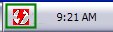
"Once you have installed and started DAEMON tools, you should now see a "lightning bolt" icon (green) next to your PC clock.
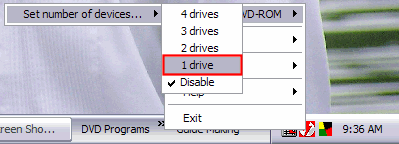
Go ahead and right click that icon and then left click "VIRTUAL CD/DVD-ROM" , then left click "Set number of devices...", then decide on how many virtual drives you wish to have. For this tutorial I only choose "1 drive" (red).
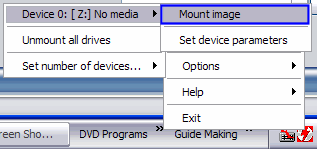
After that, go ahead and right click that "lightning bolt" icon again, left click "VIRTUAL CD/DVD-ROM" again. Then left click "Device 0: [*Letter*] No media", then left click "Mount image" (blue).
Then on the screen that pops up, navigate to where your ISO file is to mount it to the virtual drive. When you find it, click it once then click the "Open" button (purple).
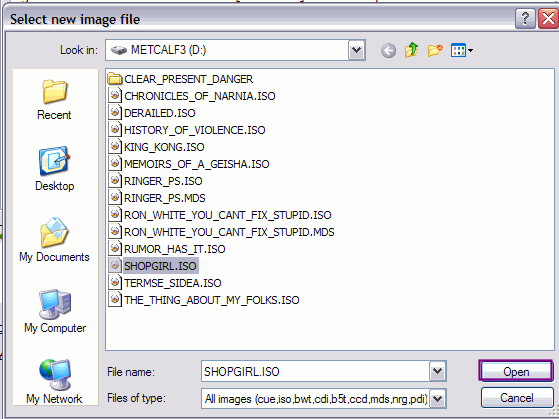
After clicking the "Open" button, it will act just like you put a DVD in. It will ask you what you want windows to do. Either pick a task for it to follow or cancel it and do your own thing if the program you want to use is not listed there.
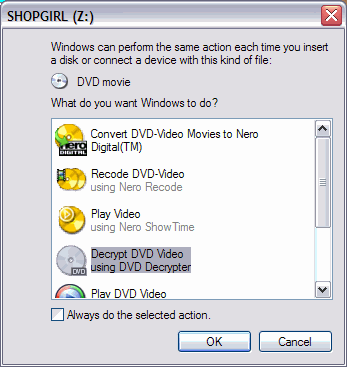
Ok your finished with loading the image. Now if you go to "My Computer", you will see a "extra" drive listed there (red). That is the "virtual drive" created by DAEMON Tools.
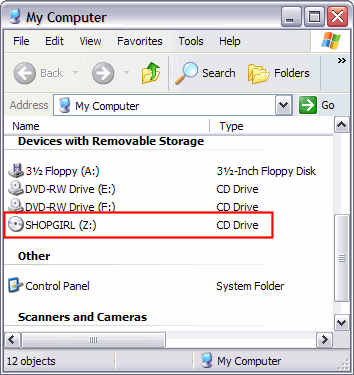
To remove it, right click that icon and then left click "VIRTUAL CD/DVD-ROM" , then left click "Set number of devices...", then click "Disable". POOF! Its gone!"
Now that you've mounted the game, if it's the first time you're running it, you know that you have to install the game. Generally, if the game requires either a serial key (or sometimes a crack) to work, there will be a .nfo file that came with the torrent download. To read the .nfo file, you need to right click it and select "Open With ->" and choose Notepad (or your .txt file viewer. Don't chose MS Word). The .nfo generally gives you installing directions. Sometimes, the .nfo will be inside the .iso file, so you want to use Daemon Tools Light to view the file. To do this, with the .iso mounted, you want to go to My Computer, right click on the virtual drive, and select "Explore." If the file is not there, see the next step.
If the .nfo file does not exist with the download package, you need to look at comments from the torrent tracker [you should have already done this
]. They generally have good instructions. Sometimes, they tell you where to find a crack for the game (this basically overwrites the .exe file the game looks at, so you can install it without a serial or play without doing the typical installation process). Sometimes, you will need both a serial number and a crack, basically just read the .nfo and comments, and if worst comes to worst, if you are still having trouble, please post/PM me a link of the torrent game you tried to install, and I'll try my best to help you CONCLUSION
I hope my guide helped you in your understanding of how to download music, videos, and even computer games. You can also download many other things, such as applications or e-books through BitTorrent trackers. Be sure to explore other torrent libraries, such as Thepiratebay.org, etc. Experiment!
Please comment!!








 Glad I could help!


