- Joined
- Jul 17, 2016
- Sythe Gold
- 613
- Messages
- 6,200
closed
Last edited:

testing the method on the second row first one completed and required shut down and restart.Think it has something to do with system registries but dont hold me to it
* Double-click My Computer, and then right-click the hard disk you want to check.
* Click Properties, and then click Tools.
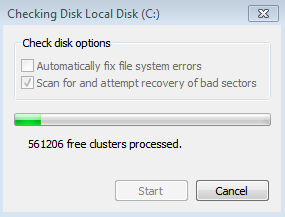
* Click Check Now under Error-checking. Then a dialog box with the Check disk options will display:
->To run Chkdsk in read-only mode, you can simply click Start.
->To repair errors without scanning the volume for bad sectors, select the Automatically fix file system errors check box.
->To repair errors, locate bad sectors, and recover readable information, select the Scan for and attempt recovery of bad sectors check box.
-> Click Start and follow the on-screen steps to do the job for you, and that should help you solve it
system restore does nothing. I reinstalled win7/64 ultimate, installed all windows updates including service pack 1 with and without some odd reason after installing service pack i can't use windows update via desktop anymore so i try not to use service pack if possible.if that doesnt work, the only thing i could think of is restoring the registry using the os disk, or doing a full system restore
win7/64 ultimatewhat operating system are you on?
done so same with drivers fully functional on other games. hmdi to monitor is functioning.and try disable multicore rendering, and check video drivers and such
i don't believe you can safe mode and play video games as if this is safe to do so anyways?last suggestion for right now as im exhausted, have you tried clean booting it, or safe mode and see if the error occurs there?