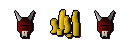
warning dds Forum Addict Joined May 8, 2007 Sythe Gold 0 Messages 375 Age 33 Location in you sisters pants =] Oct 23, 2007 #1 lol nvm i found out how to use gimp and make them transparent
♬♩ Young Forever ♪ ♫ Joined Feb 12, 2007 Sythe Gold 80 Messages 7,204 Location United States Oct 23, 2007 #2 Did you try Google?
warning dds Forum Addict Joined May 8, 2007 Sythe Gold 0 Messages 375 Age 33 Location in you sisters pants =] Oct 23, 2007 #3 did you under stand my question i know where to get them i want to know how to get rid of the black stuff example in first post.
did you under stand my question i know where to get them i want to know how to get rid of the black stuff example in first post.
Xjaa Penguin Joined Jan 21, 2007 Sythe Gold 0 Messages 3,248 Location :noitacoL Oct 23, 2007 #4 runescape.com should have them in the knowledge base all save them as .PNG they will have a pink background when you save them but in Ps they won't
runescape.com should have them in the knowledge base all save them as .PNG they will have a pink background when you save them but in Ps they won't
warning dds Forum Addict Joined May 8, 2007 Sythe Gold 0 Messages 375 Age 33 Location in you sisters pants =] Oct 24, 2007 #5 im not useing photoshop im useing amity userbar generator
Pukey Active Member Joined Aug 8, 2007 Sythe Gold 0 Messages 175 Oct 27, 2007 #6 easiest way would be to magnetic lasso around the image you want if you have that option :S
warning dds Forum Addict Joined May 8, 2007 Sythe Gold 0 Messages 375 Age 33 Location in you sisters pants =] Oct 28, 2007 #7 lol nvm i found out how to use gimp and make them transparent