



I have seen people that are trying to charge on this site for gamerscore modding, and it's actually very simple, so I asked my friend if I could use his guide to post here, he agreed so here it is:
~Full credit for this guide goes to Frvwfr3 from HF!~
TUTORIAL CREATED BY MY FRIEND, FRVWFR3 - FUL CREDIT GOES TO HIM!!!
~Full credit for this guide goes to Frvwfr3 from HF!~
This is for modding gamerscore for any XBL account.
Downloads before you begin:
http://www.game-tuts.com/community/modio.php
^Modio
http://download797.mediafire.com/uyg4dpy2m1dg/cjnvymztzzl/ProfileEditor2.zip
^Profile Editor v2.2
http://rarlab.com/rar/wrar393.exe
^Winrar
http://adf.ly/43iT
^Dotnet Frameworks( Leaving as adf.ly the link is 3 lines long 0.o)
To start you need to copy your Xbox profile to a USB flash drive.
To do this you need to go to your dashboard, then go to system settings then Memory.
Go to the storage device where your profile is currently, then Move it to the flash drive. Remove the flash drive and go to your computer.
,.-^-.,.-^-.,.-^-.,.-^-.
Extract the Profile
1: Open up Modio
2: Click the M at the top and go to explore my device.
3: Click File>Open
4: Click Content>(Your profile name)>Profile storage> Profiles
5: Right click the file there and hit extract. (Saving to desktop is easiest)
Picture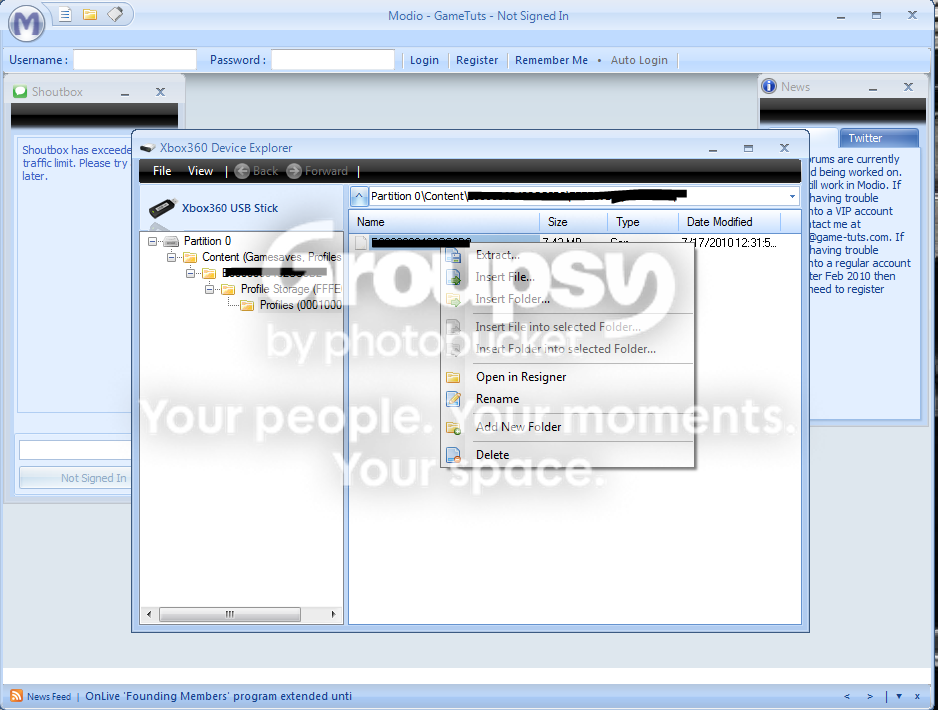
,.-^-.,.-^-.,.-^-.,.-^-.
Mod Gamerscore
1: Open up Profile Editor
2: Click Open and then find the file you saved to your Desktop
3: A list of games will appear on the left. Click on one.
4: At the bottom right hit the 'Unlock all offline' button.
5: Click the next game and repeat.
6: (BE WARNED, DO NOT RAISE YOUR SCORE TOO HIGH OR YOU RISK RESET)
7: After you finish all of your games, Click 'Save'
Picture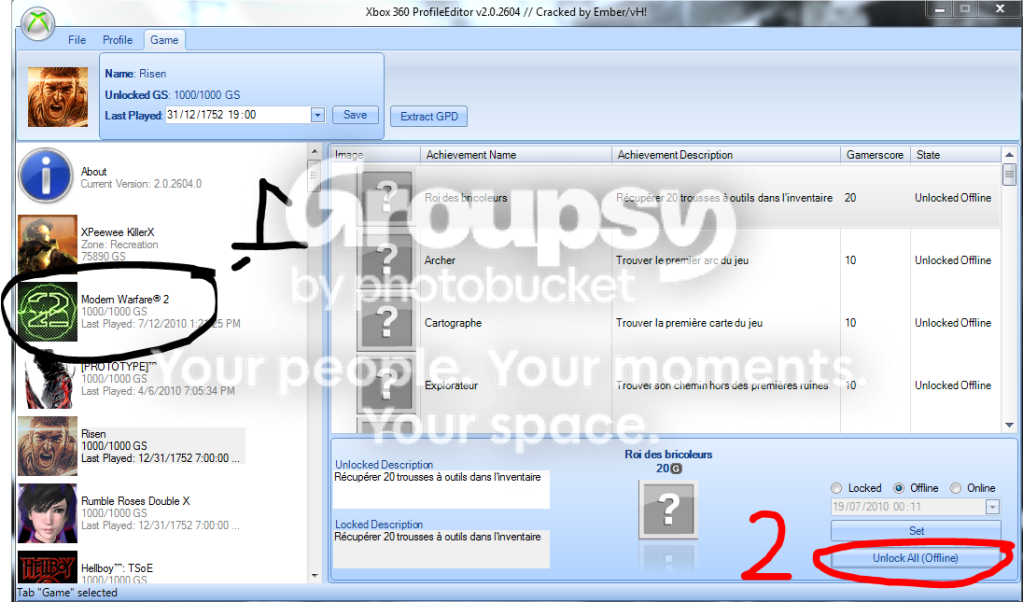
,.-^-.,.-^-.,.-^-.,.-^-.
Rehash/Resign the file
1: Open up Modio
2: Click the blue M->Open->Open From Computer
3: Find the file you saved to your desktop
4: Once you open the file. It should open up a box inside Modio.
5: At the bottom right of the small box, click 'Rehash and Resign'
6: Close the small window inside Modio.
Picture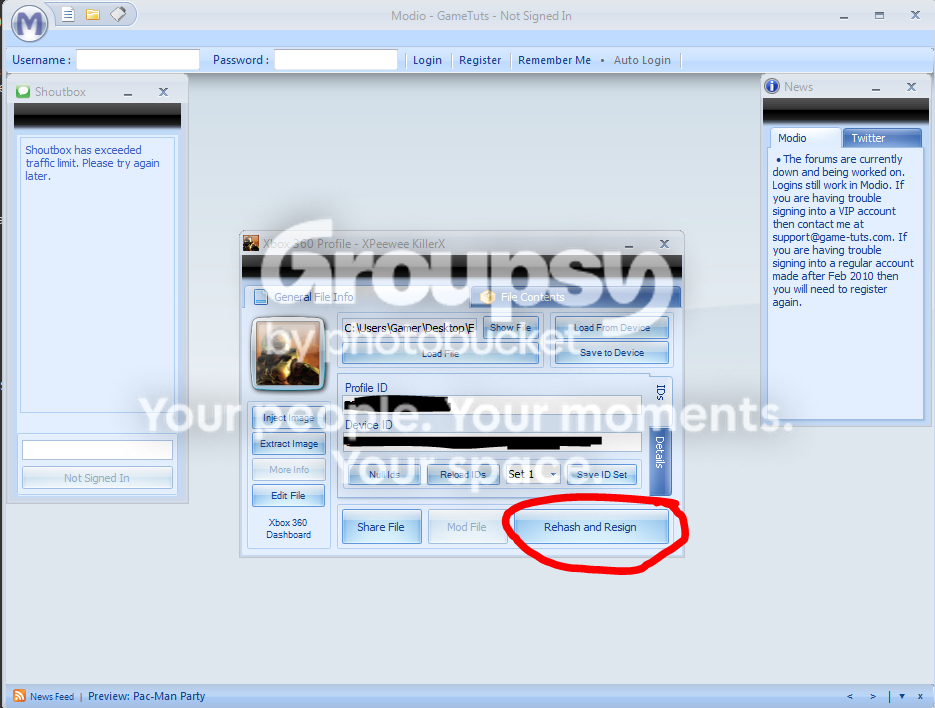
,.-^-.,.-^-.,.-^-.,.-^-.
For Reinserting the file.
1: Go back to "Explore My Device"
2: Go to File>Open Device
3: Open up the "Content" folder and navigate through the folders to where your profile FILE is located (the one you extracted earlier)
4: Drag/drop the file from your desktop into the box on the right where the file is. It should give you the option of 'Replace'? Click yes.
5: Insert USB into Xbox
Picture
,.-^-.,.-^-.,.-^-.,.-^-.
Move back to Console
1: Go to system settings>Memory.
2: go to your USB storage device and find your now modded profile.
3: Click the profile and move it back to the storage device it was on previously.
4: Login
5: IMPORTANT: Give the file time to update the GS!!!! My accounts if I mod them to 100k GS it takes ~10 minutes to update XBL!!
6: A easy way to know when you are done, is to have a friend go into a party with you. And check occasionaly what the score is at. Once it matches the score that your Xbox says, it is done.
,.-^-.,.-^-.,.-^-.,.-^-.,.-^-.,.-^-.,.-^-.,.-^-.,.-^-.,.-^-.,.-^-.,.-^-.,.-^-.,.-^-.,.-^-.,.-^-.,.-^-.,.-^-.,.-^-.,.-^-.,.-^-.,.-^-.,.-^-.,.-^-.
If you have any questions or need help please PM me!!!
Credits: Creators of Modio, Profile Editor and all the other programs used.
Thanks! Hope you enjoy this!
TUTORIAL CREATED BY MY FRIEND, FRVWFR3 - FUL CREDIT GOES TO HIM!!!


