


R
RuneLocus`
Guest
RuneLocus` has reported a post.
Reason:
Forum: RuneScape 2 Server Development
Assigned Moderators: stevenadrien2, WøW §u¢ks
Posted by: Call A Medic
Original Content:
Reason:
Post: Moparscape Server Guide {Improved}Leeched, pictures and my reply for proof.
I oblige you to delete this directly.
On behalf of the RuneLocus community.
Forum: RuneScape 2 Server Development
Assigned Moderators: stevenadrien2, WøW §u¢ks
Posted by: Call A Medic
Original Content:
[size=25pt]How to make a private server[/size]
How to make a server[/anchor]
The only Chapter which is a little bit difficult for some people is the No-IP part or Port Forwarding.
Other parts are easy enough for everyone.
This guide is made for Moparscape.org, RuneLocus.com and Sythe.org!
Do NOT use this on any other site without permission. >[email protected]<
You pay PM me for further help AFTER reading this guide.
-Contents-
Chapter 1 - Getting JDK
Chapter 2 - Downloading and Installing No-Ip
Chapter 3 - Getting a Client
Chapter 4 - Opening 43594 (Default Port)
Chapter 5 - Port Forwarding
Chapter 6 - Getting a Source
Chapter 7 - Fixing the error 'The system could not find the path specified'
Chapter 8 - Server Edit's
Chapter 1
Getting JDK
First we need JDK 6.
Download it here
Click JDK 6 Update 2, you will get a popup, click Yes.
Check the box 'I agree' and click on one of the 2 downloads you can choose and install it.
Top • Bottom • Contents
Chapter 2
Downloading and Installing No-IP
You can download No-IP from the official site.
Go to the official site by clicking here.
Click on the register tab and register an account.
If you are there click the Downloads tab.
Now you will have a page with something like this.

In this tutorial I will teach everything for windows.
So click on Windows.
Now click on the link/image to download.com and you can download and install it through that page.
Once you installed No-IP you will have a button on your desktop to run it.
Run it and your No-IP will open.
It will look like this.

On the bottom you see I made one part a little bit red with a low opacity.
Click the 'Here' to add a new IP.
Let the page load and you will see this button somewhere.

Click on it to add an IP.
This page will have 2 Fields.
Hostname information and E-Mail settings.
Just ignore the E-Mail field.
The Hostname field will look like this.
At the first text field fill in your server name.
Click on the image to view the list of domains you can choose, or if your already on that real page you can see it also.
The Ip Address part will auto change to your IP, do not change it.
Once you're done click 'Create Host' at the bottom and click the 'Refresh' at the No-IP Menu on your computer.
Top • Bottom • Contents
Chapter 3
Getting a client
To play a server you will need a client.
You can make your own client but for newcomers it is not very helpful.
So I will advise you to download the Moparscape client.
You can download it through this page.
Just run the file you've downloaded and your installation will start.
More information on this thread:
http://moparscape.org/smf/index.php/topic,6915.0.html

Using older versions will close the window.
It is not a bug.
Top • Bottom • Contents
Chapter 4
Opening 43594 (Default Port)
Open Network & Internet Connections. Right click on the connection you're using to connect to the internet and click properties. Open the Advanced tab and click on firewall settings. Open the Exceptions tab and at the bottom you should see a button "Add Port".
Click on it, and add your server name or whatever you want it to be at the Name field.
At the Port number fill in 43594.
And make sure the TCP box has been checked.

Top • Bottom • Contents
Chapter 5
Port forwarding (Router Users, Using Linksys)
You don't use linksys? Find your router at
http://www.portforward.com/english/routers/port_forwarding/routerindex.htm
and follow the tutorial.
Open your cmd by going to Start > Run > cmd.
Type in `ipconfig´
It will say your default gateway.

Open a web browser like internet explorer or Netscape. Enter the gateway in the address bar of your browser. In the picture above the address bar has http://www.google.com in it. Just replace all of that with the ip address of your router. By default the ip address should be set to 192.168.1.1.

You should see a box prompting you for your username and password. Enter your username and password now. By default the username is blank, and the password is admin. Click the Ok button to log in to your router.

Click the Applications & Gaming link near the top of the page.
The menu under that should change. In this new menu, click Port Range Forwarding.

When you're finished, click Save Settings near the bottom of the screen to save your changes.
Example:
Application Name: RSPS
Start - End Port: 43594-43594 (Change to which ports to want to enable)
Protocol: Both
To IP Address: Your IP at Start > Run > Cmd > ipconfig
Enabled: Checked/Yes
Top • Bottom • Contents
Chapter 6
Getting a source
To make your own server you need a source.
The best and easy way is by downloading it from the Download section.
But be watch out! Some sources contain trojans, keyloggers and such things.
So I advise you to just download the most used sources.
Cheezscape 80 - http://xc17.ulmb.com/download/rs2priv/Cheezscape_80.zip
Cheezscape PK 78 - http://xc17.ulmb.com/download/rs2priv/Cheezscape_PK_78.zip
Project16 V6 - http://xc17.ulmb.com/download/rs2priv/Project16_V6.zip
TestScape - http://xc17.ulmb.com/download/rs2priv/TestScape.zip
PimpScape - http://xc17.ulmb.com/download/rs2priv/PimpScape.zip
Once you downloaded it you can start editing the source.
The most things you need to edit are in client.java.
Open it and Press Ctrl + H.
In the first field fill in the source's server name.
In the second field fill in the name of your server.
Now press replace all.
Top • Bottom • Contents
Chapter 7 - The error 'The system could not find the path specified.'
By Tico135
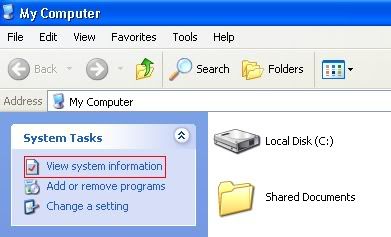
Open up "My Computer".

Click "View System information"
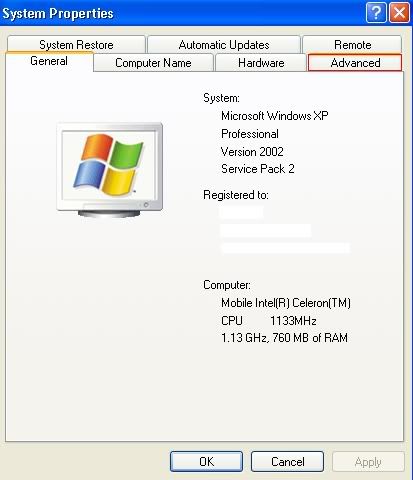
Click "Advanced".
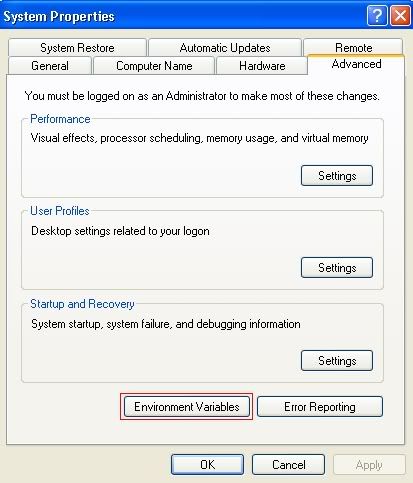
Click "Environment Variables".
Under "User Variables" click "New".
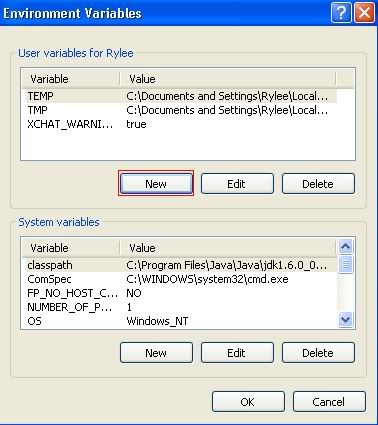
Name it "CLASSPATH" and for the "Variable Value" (only if you have JDK 6u1) put this in: CLASSPATH=C:\Program Files\Java\jdk1.6.0_01\bin;%CLASSPATH%; If you have JDK 6u2, you must enter CLASSPATH=C:\Program Files\Java\jdk1.6.0_02\bin;%CLASSPATH%; for the variable value.
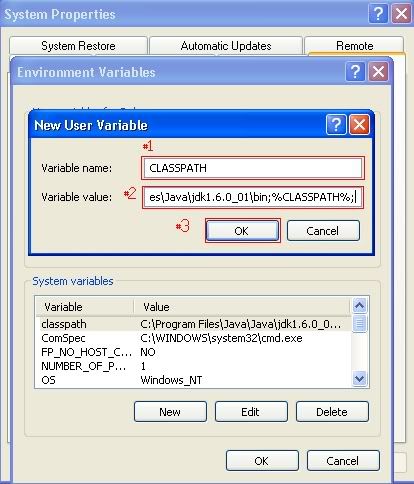
Under "User Variables" click "New".
Name it "PATH" and for the "Variable Value" (only if you have JDK 6u1) put this in: C:\Program Files\Java\jdk1.6.0_01\bin If you have JDK 6u2, you must enter C:\Program Files\Java\jdk1.6.0_02\bin for the variable value.
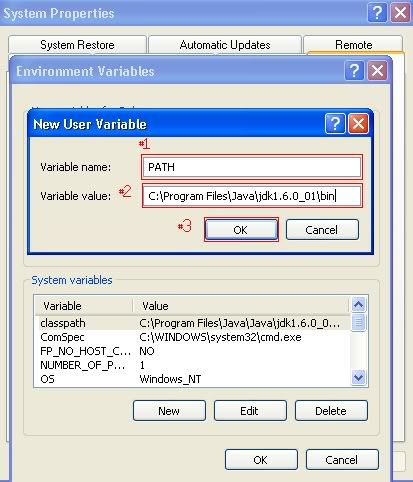
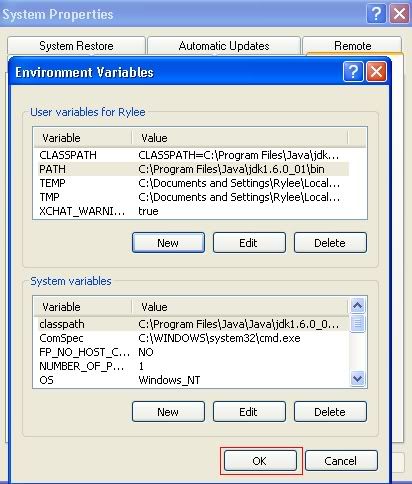
Click "OK".
Click "OK".
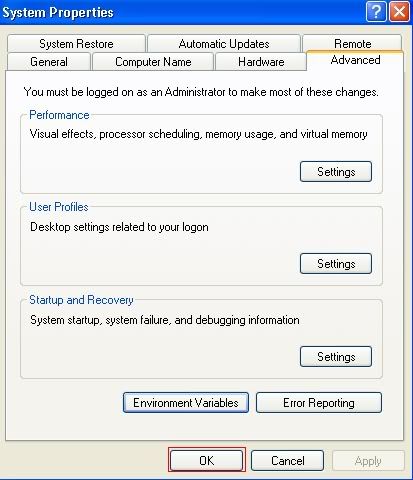
Your computer now recognizes Java.
Top • Bottom • Contents
[size=25pt]Server edits[/size]
Making yourself an admin
Testscape & Many other sources
Go into client.java.
Press Ctrl + F.
And fill in this.
Under that you will see something like this for example.Code://start of moderator/admin list, 1 = mod, 2 = staff, 3 = admin
If you look at it instead of just directly editing it and not learning something you know what this is.Code:if (playerName.equalsIgnoreCase("admin")) { playerRights = 3; }
Its just like 'If the name of the player is: admin give him playerrights 3 (Owner rights)'
Player Rights 3 = Server Owner
Player Rights 2 = Server Admin
Player Rights 1 = Server Player Moderator
NOTE: In some basic sources like testscape the server owners can't see their own crown.
Don't be affraid, other people can see it!
In JorsaScape (Pimpscape) based servers you can just open the datafolder and admins/administrators/staff.txt and add a new player to it.
I don't know the file name really since many Jorsa/Pimpscape based sources are changing the file name.
Adding NPC's
To add NPC's you work in autospawn.cfg
Open it and you will see many things looking like eachother.
Now add this somewhere
Change NpcID to the ID of the npc.Code:spawn = NpcID CoordX CoordY 0 0 0 0 0 2 NPC Name
Change CoordX and CoordY to the coords where you want the npc to be.
If you don't know how to get the coords press F4 (Moparscape client).
Also, no your not a ub3r good coder when you made a command or added a npc.
Compiling
After every update in the .java files you have to compile it.
Compiling will make .class files off them and your server runs on them.
For just an easy compiler make a new text file with notepad.
Add this to it:
Click Save as...Code:@echo off title Server Compiler "C:\Program Files\Java\jdk1.5.0_06\bin\javac.exe" -cp . *.java pause
And change file type to 'All Files' and name it compile.bat
Now when running the compile.bat you will compile your server.
Running the server
To run the server you just run 'Run.bat' or however it is called in your source.
I can't give you an code for it because some sources have different folders to save the class files in.
Make sure your No-IP is running!
Questions, Answers on them are allowed.
Corrections are also welcome.
-----------------------------------------
Making SilabSoft client items work on your server
-Table of Contents-
Chapter#1 - SilabSoft Client FAQ's
Chapter#2 - Getting SilabSoft Client to Work
Chapter#3 - Updates
Update #1
Update #2
Update #3
-----------------------------------------
SilabSoft Client may be downloaded here.
[anchor=silabsclient][size=14pt]SilabSoft Client FAQ's[/anchor]
You can now use the webclient at http://client.silabsoft.org .[/i]
[anchor=pickup][size=26pt]How to Make Your Silabs Client Items Work[/size][/anchor]
What do I have to do to make Silabs new client work? What you have to do is very simple. Find this code in client.java:
Replace your "pickup" command with this one"Code:else if (command.startsWith("pickup") && playerRights >= 2)) { try { int newItemID = Integer.parseInt(command.substring(7,11)); int newItemAmount = Integer.parseInt(command.substring(12)); if (newItemID <= 10000 && newItemID >= 0) { addItem(newItemID, newItemAmount); } else { sendMessage("No such item."); } } catch(Exception e) { sendMessage("Wrong Syntax! Use as ::pickup 0995 10"); }
Code:if (command.startsWith("pickup") && (playerRights >= 3)) { try { int newItemID = Integer.parseInt(command.substring(7,12)); int newItemAmount = Integer.parseInt(command.substring(13)); if (newItemID <= 20000 && newItemID >= 0) { addItem(newItemID, newItemAmount); } else { sendMessage("That Item Doesn't Exist"); } } catch(Exception e) { sendMessage("Cmon Type IT AGIAN ! "); } }
This code is a command. It is used to spawn items, it is built slightly different from a command, because instead of doing something by just typing the actual command, you need to put in the item ID and command. The 'int newItemId = Integer.parseInt(command.substring(7,12));' tells the server that you are spawning a new item. The 'int newItemAmount = Integer.parseInt(command.substring(13));' tells the server how much of that item you want. The 'addItem(newItemID, newItemAmount);' actually gives you the item into your inventory. You may also know this command as 'Item' on some servers.
If that doesn't work, then add this command:
Code:if (command.startsWith("pick")) { try { int newitem = Integer.parseInt(command.substring(5)); if (newitem >= 0) { addItem(newitem, 1); } else { sendMessage("No such item"); } } catch(Exception e) { sendMessage("Bad item ID"); }
This command is doing the same thing as the command above, it is telling the server that you wish to spawn an item, and a certain amount of that item. Very basic.
You will also have to go into Item.cfg and add the item id with their prices and bonuses.
Also, in Item.java, you must add the Item ID to the correct spot. I.E. Hats, Gloves, Body, FullHelm...
If you have any questions, please feel free to ask them. But remember, your question will most likely be already asked, so please read the thread first. I will also update this thread will fixes to errors you may get.
[iurl=#top]Top[/iurl] • [iurl=#bottom]Bottom[/iurl] • [iurl=#toc]Contents[/iurl]
[anchor=updates][size=16pt]Updates[/size][/anchor][anchor=update1][size=14pt]Update #1[/size][/anchor]
Step 1: Go into Item.Java, find:
Code:public static boolean[] itemStackable = new boolean[10000];
Step 2: Next replace it from the first to the last with:
Code:public static boolean[] itemStackable = new boolean[11999]; public static boolean[] itemIsNote = new boolean[11999]; public static boolean[] itemTwoHanded = new boolean[11999]; public static boolean[] itemTradeable = new boolean[11999]; public static boolean[] itemSellable = new boolean[11999];
What this code basically does, is declaring how large the arrays are.
[iurl=#top]Top[/iurl] • [iurl=#bottom]Bottom[/iurl] • [iurl=#toc]Contents[/iurl]
[anchor=update2][size=14pt]Update #2[/size][/anchor]
This part is added on information that will help you with trading and so fourth.
Duel Items:
Search for:
Code:otherDuelItems[i] > 10000
Replace with:
Code:otherDuelItems[i] > 20000
Search for:
Code:otherDuelItems[i] = 10000;
Replace with:
Code:otherDuelItems[i] = 20000;
Equipment Items:
Search for:
Code:item < 10000
Replace with:
Code:item < 20000
Search for:
Code:if(playerItems[rr] > 0 && playerItems[rr] < 10000)
Replace with:
Code:if(playerItems[rr] > 0 && playerItems[rr] < 20000)
Items:
Search for:
Code:playerItems[i] > 10000
Replace with:
Code:playerItems[i] > 20000
Search for:
Code:playerItems[i] = 10000;
Replace with:
Code:playerItems[i] = 20000;
Clues:
Search for:
Code:clueItems[i] > 10000
Replace with:
Code:clueItems[i] > 20000
Search for:
Code:clueItems[i] = 10000;
Replace with:
Code:clueItems[i] = 20000;
Smithing Items:
Search for:
Code:Item.SmithingItems[i][0] > 10000
Replace with:
Code:Item.SmithingItems[i][0] > 20000
Search for:
Code:playerItems[i] = 10000;
Replace with:
Code:playerItems[i] = 20000;
On Reset Items:
Search for:
Code:playerTItems[i] > 10000
Replace with:
Code:playerTItems[i] > 20000
Search for:
Code:playerTItems[i] = 10000;
Replace with:
Code:playerTItems[i] = 20000;
Items on Trade:
Search for:
Code:playerOTItems[i] > 10000
Replace with:
Code:playerOTItems[i] > 20000
Search for:Code:playerOTItems[i] = 10000;
And replace with:
Code:playerOTItems[i] = 20000;
Shop Items:
Search for:
Code:server.shopHandler.ShopItems[ShopID][i] > 10000
Replace with:
Code:server.shopHandler.ShopItems[ShopID][i] > 20000
Bank Items:
Search for:
Code:bankItems[i] > 10000
Replace with:
Code:bankItems[i] > 20000
Its basically, find every 10000 vaule in client.java and replace it with 20000. That might not be them all so recheck your client.java
Now open up Item.java
If you scroll down a bit, you will see a large code that says: capes, boots, gloves etc. Erase that entire thing, and replace it with this:
[iurl=#top]Top[/iurl] • [iurl=#bottom]Bottom[/iurl] • [iurl=#toc]Contents[/iurl]
[quote author=Tico135 link=topic=195630.msg1754136#msg1754136 date=1189719796]
Code://Few item types for equipping public static int capes[] = {10412,11370,6568,6111,7623,6570,6568,1007,7655,7650,7648,7653,1019,1021,1023,1027,1029,1031,1052,2412,2413,2414,4304,4315,4317,4319,4321,4323,4325,4327,4329,4331,4333,4335,4337,4339,4341,4343,4345,4347,4349,4351,4353,4355,4357,4359,4361,4363,4365,4367,4369,4371,4373,4375,4377,4379,4381,4383,4385,4387,4389,4391,4393,4395,4397,4399,4401,4403,4405,4407,4409,4411,4413,4514,4516,6070,6568,6570,4315,7535,4515,4513,7535,3759,3761,3763,3765,3777,3779,3781,3783,3785,3787,3789,6959,6111,6570,6568,1007,1019,1021,1023,1027,1029,1031,1052,2412,2413,2414,4304,4315,4317,4319,4321,4323,4325,4327,4329,4331,4333,4335,4337,4339,4341,4343,4345,4347,4349,4351,4353,4355,4357,4359,4361,4363,4365,4367,4369,4371,4373,4375,4377,4379,4381,4383,4385,4387,4389,4391,4393,4395,4397,4399,4401,4403,4405,4407,4409,4411,4413,4514,4516,6070,6568,6570,7623,7626,7628,7630,7632,7634,7636,7638,7640,7657,7672,7674,7678,7680,7676,7685,7682,11191,11192,11193,11194,10704,10705,10707,10708,10710,10711,10713,10714,10716,10717,10719,10720,10722,10723,10725,10726,10728,10729,10731,10732,10734,10735,10737,10738,10740,10741,10743,10744,10746,10747,10749,10750,10752,10753,10755,10756,10758,10759,10761,10762,10764,10765,10767,10768,10770,10771}; public static int boots[] = {6619,1044,11981,7596,6061,6106,88,89,626,628,630,632,634,1061,1837,1846,2577,2579,2894,2904,2914,2924,2934,3061,3105,3107,3791,4097,4107,4117,4119,4121,4123,4125,4127,4129,4131,4310,5064,5345,5557,6069,6106,6143,6145,6147,6328,6349,6357,6367,6377,7596,7159,7114,6893,6790,6666,6619,6920,6061,6106,88,89,626,628,630,632,634,1061,1837,1846,2577,2579,2894,2904,2914,2924,2934,3061,3105,3107,3791,4097,4107,4117,4119,4121,4123,4125,4127,4129,4131,4310,5064,5345,5557,6069,6106,6143,6145,6147,6328,3393,7664,7666,7700}; public static int gloves[] = {6922,11157,11161,10410,11153,11137,7453,7454,7455,7456,7457,7458,7459,7460,7461,7462,6629,7595,7462,2491,1065,2487,2489,3060,1495,775,777,778,6708,1059,1063,1065,1580,2487,2489,2491,2902,2912,2922,2932,2942,3060,3799,4095,4105,4115,4308,5556,6068,6110,6149,6151,6153,2997,6359,6369,6379,6347,6330,7595,7453,6720,6629,6922,2491,1065,2487,2489,3060,1495,775,777,778,6708,1059,1063,1065,1580,2487,2489,2491,2902,2912,2922,2932,2942,2799,3060,3799,4095,4105,4115,4308,5556,6068,6110,6149,6151,6153,7454,7455,7456,7457,7458,7459,7460,7461,7462,3391,7671,7688,11711}; public static int shields[] = {6889,3101,11145,7053,1171,1173,1175,1177,1179,1181,1183,1185,1187,1189,1191,1193,1195,1197,1199,1201,1540,2589,2597,2603,2611,2621,2629,2659,2667,2675,2890,3122,3488,3758,3839,3840,3841,3842,3843,3844,4072,4156,4224,4225,4226,4227,4228,4229,4230,4231,4232,4233,4234,4302,4507,4512,6215,6217,6219,6221,6223,6225,6227,6229,6231,6233,6235,6237,6239,6241,6243,6245,6247,6249,6251,6253,6255,6257,6259,6261,6263,6265,6267,6269,6271,6273,6275,6277,6279,6524,7350,7352,7354,7356,7358,7360,7348,7346,7344,7342,7340,7338,7336,6894,6631,6633,6889,7332,7334,1171,1173,1175,1177,1179,1181,1183,1185,1187,1189,1191,1193,1195,1197,1199,1201,1540,2589,2597,2603,2611,2621,2629,2659,2667,2675,2890,3122,3488,3758,3839,3840,3841,3842,3843,3844,4072,4156,4224,4225,4226,4227,4228,4229,4230,4231,4232,4233,4234,4302,4507,4512,6215,6217,6219,6221,6223,6225,6227,6229,6231,6233,6235,6237,6239,6241,6243,6245,6247,6249,6251,6253,6255,6257,6259,6261,6263,6265,6267,6269,6271,6273,6275,6277,6279,6524,7643,7625,7692,10226,10227,10228,10229,10230,10231,10232,11814}; public static int hats[] = {6623,11156,11160,11164,10407,11140,11136,11144,9200,6621,7656,7649,7651,7654,7594,7532,7394,4753,4732,4745,4856,4857,4858,4859,4880,4881,4882,4883,4904,4905,4906,4907,4928,4929,4930,4931,4952,4953,4954,4955,4976,4977,4978,4979,4611,6188,6182,4511,4056,4071,4724,2639,2641,2643,2665,6109,5525,5527,5529,5531,5533,5535,5537,5539,5541,5543,5545,5547,5549,5551,74,579,656,658,660,662,664,740,1017,1037,1038,1040,1042,1044,1046,1048,1050,1053,1055,1057,1137,1139,1141,1143,1145,1147,1149,1151,1153,1155,1157,1159,1161,1163,1165,1506,1949,2422,2581,2587,2595,2605,2613,2619,2627,2631,2633,2635,2637,2651,2657,2673,2900,2910,2920,2930,2940,2978,2979,2980,2981,2982,2983,2984,2985,2986,2987,2988,2989,2990,2991,2992,2993,2994,2995,3057,3385,3486,3748,3749,3751,3753,3755,3797,4041,4042,4071,4089,4099,4109,4164,4302,4506,4511,4513,4515,4551,4567,4708,4716,4724,4856,4857,4858,4859,4880,4881,4882,4883,4904,4905,4906,4907,4952,4953,4954,4955,4976,4977,4978,4979,5013,5014,5554,5574,6109,6128,6131,6137,6182,6188,6335,6337,6339,6345,6355,6365,6375,6382,6392,6400,6918,2979,2980,2981,2982,2983,2984,2985,2986,2978,1038,1040,1042,1044,1046,1048,6182,4516,4514,6547,6548,4168,4166,3327,3329,3331,3333,3335,3337,3339,3341,3343,2645,2647,2649,1167,1169,6326,7594,7539,7534,7327,7325,7323,7321,7319,7136,7130,7124,7112,7003,6895,6887,6886,6885,6862,6860,6858,6856,6665,6621,6623,6918,6656,7400,7321,7323,7219,7325,7327,7396,7394,4732,4753,4611,6188,6182,4511,4056,4071,4724,2639,2641,2643,2665,6109,5525,5527,5529,5531,5533,5535,5537,5539,5541,5543,5545,5547,5549,5551,74,579,656,658,660,662,664,740,1017,1037,1038,1040,1042,1044,1046,1048,1050,1053,1055,1057,1137,1139,1141,1143,1145,1147,1149,1151,1153,1155,1157,1159,1161,1163,1165,1506,1949,2422,2581,2587,2595,2605,2613,2619,2627,2631,2633,2635,2637,2651,2657,2673,2900,2910,2920,2930,2940,2978,2979,2980,2981,2982,2983,2984,2985,2986,2987,2988,2989,2990,2991,2992,2993,2994,2995,3057,3385,3486,3748,3749,3751,3753,3755,3797,4041,4042,4071,4089,4099,4109,4164,4302,4506,4511,4513,4515,4551,4567,4708,4716,4724,4745,4753,4856,4857,4858,4859,4880,4881,4882,4883,4904,4905,4906,4907,4952,4953,4954,4955,4976,4977,4978,4979,5013,5014,5554,5574,6109,6128,6131,6137,6182,6188,6335,6337,6339,6345,6355,6365,6375,6382,6392,6400,6885,6886,7621,7624,7627,7629,7631,7633,7635,7637,7639,7641,6887,7652,7647,7658,7663,7665,7673,7675,7677,7679,7681,7686,7687,7691,7693,7694,7683,7697,10261,10262,10263,10264,10265,10266,10267,10268,10269,10270,10271,10706,10709,10712,10715,10718,10721,10724,10727,10730,10733,10736,10739,10742,10745,10748,10751,10754,10757,10760,10763,10766,10769,10771,11938,11939,11940}; public static int amulets[] = {3861,10413,11141,7803,6585,86,87,295,421,552,589,1478,1692,1694,1696,1698,1700,1702,1704,1706,1708,1710,1712,1725,1727,1729,1731,4021,4081,4250,4677,6040,6041,6208,4306,2406,1716,1722,1796,774,1009,1654,616,6544,6863,6861,6859,6857,6707,6577,1724,1718,6585,86,87,295,421,552,589,1478,1692,1694,1696,1698,1700,1702,1704,1706,1708,1710,1712,1725,1727,1729,1731,4021,4081,4250,4677,6040,6041,6208,11716}; public static int arrows[] = {78,598,877,878,879,880,881,882,883,884,885,886,887,888,889,890,891,892,893,942,2532,2533,2534,2535,2536,2537,2538,2539,2540,2541,2866,4160,4172,4173,4174,4175,4740,5616,5617,5618,5619,5620,5621,5622,5623,5624,5625,5626,5627,6061,6062,4798,4793,4788,4783,4773,4778,4803,78,598,877,878,879,880,881,882,883,884,885,886,887,888,889,890,891,892,893,942,2532,2533,2534,2535,2536,2537,2538,2539,2540,2541,2866,4160,4172,4173,4174,4175,4740,5616,5617,5618,5619,5620,5621,5622,5623,5624,5625,5626,5627,6061,6062}; public static int rings[] = {6735,6737,6731,773,1635,1637,1639,1641,1643,1645,2550,2552,2554,2556,2558,2560,2562,2564,2566,2568,2570,2572,4202,4657,6465,7927,6583,6583,6564,6575,6731,6733,6735,6737,773,1635,1637,1639,1641,1643,1645,2550,2552,2554,2556,2558,2560,2562,2564,2566,2568,2570,2572,4202,4657,6465}; public static int body[] = {4091,11154,11158,11162,10408,11134,11138,11143,6139,6129,6615,6916,7390,7592,5032,5034,5030,1135,2499,2501,2503,6916,1035,540,5553,4757,1833,6388,6384,1355,4111,4101,4091,6186,6184,6180,3058,4509,4504,4069,4728,4736,4712,6107,2661,3140,1101,1103,1105,1107,1109,1111,1113,1115,1117,1119,1121,1123,1125,1127,1129,1131,1133,2583,2591,2599,2607,2615,2623,2653,2669,3387,3481,4712,4720,4728,4749,4892,4893,4894,4895,4916,4917,4918,4919,4964,4965,4966,4967,6107,6133,6322,6180,6065,5575,4298,2936,2926,2916,2906,2405,1844,1757,636,638,640,642,644,581,577,284,6402,6394,6361,6371,6351,6341,5024,5026,5028,5030,5032,5034,3793,3767,3769,3771,3773,3775,4868,4869,4870,4871,6139,6129,2503,7592,546,544,7376,7374,7372,7370,7364,7362,7134,7128,7122,7110,6788,6786,6750,6615,6617,6916,6654,7390,7392,7362,7364,7399,7374,7376,7372,7370,1035,540,5553,4757,1833,6388,6384,2501,2499,4111,4101,4091,6186,6184,6180,3058,4509,4504,4069,4728,4736,4712,6107,2661,3140,1101,1103,1105,1107,1109,1111,1113,1115,1117,1119,1121,1123,1125,1127,1129,1131,1133,1135,2499,2501,2503,2583,2591,2599,2607,2615,2623,2653,2669,3387,3481,4712,4720,4728,4749,4916,4917,4918,4919,4964,4965,4966,4967,6107,6133,6322,3387,2503,4712,3387,7642,7660,7661,7667,7669,7689,7695,7698,11169,11171,11173,11175,11177,11179,11181,11183,11185,11187,11198,11199,11200,11125,11126,11127,11128,11129,11268}; public static int legs[] = {6141,11155,11159,11163,10409,11142,11139,11135,6130,6627,6625,7386,7593,426,1835,538,1033,5555,4759,6386,6390,2497,2495,2493,1099,4113,4103,4093,6924,6187,6185,6181,3059,4510,4505,4070,6108,538,542,548,1011,1013,1015,1067,1069,1071,1073,1075,1077,1079,1081,1083,1085,1087,1089,1091,1093,2585,2593,2601,2609,2617,2625,2655,2663,2671,3059,3389,3472,3473,3474,3475,3476,3477,3478,3479,3480,3483,3485,3795,4087,4585,4712,4714,4722,4730,4738,4751,4759,4874,4875,4876,4877,4898,4899,4900,4901,4922,4923,4924,4925,4946,4947,4948,4949,4970,4971,4972,4973,4994,4995,4996,4997,5048,5050,5052,5576,6107,6130,6187,6390,6386,6390,6396,6404,6181,6067,4300,2938,2928,2918,2908,1845,1095,1097,646,648,650,652,654,285,6406,6398,6353,6363,6373,6343,6324,5036,5038,5040,5042,5044,5046,5048,5050,5052,6141,6135,6130,7593,7380,7382,7384,7368,7366,7138,7132,7126,7116,6789,6787,6752,6627,6625,6809,6924,6655,7386,7388,7366,7368,7398,7378,426,1835,538,1033,5555,4759,6386,6390,2497,2495,2493,1099,4113,4103,4093,6187,6185,6181,3059,4510,4505,4070,6108,538,542,548,1011,1013,1015,1067,1069,1071,1073,1075,1077,1079,1081,1083,1085,1087,1089,1091,1093,2585,2593,2601,2609,2617,2625,2655,2663,2671,3059,3389,3472,3473,3474,3475,3476,3477,3478,3479,3480,3483,3485,3795,4087,4585,4712,4714,4722,4730,4738,4751,4759,4874,4875,4876,4877,4898,4899,4900,4901,4922,4923,4924,4925,4946,4947,4948,4949,4970,4971,4972,4973,4994,4995,4996,4997,5048,5050,5052,5576,6107,6130,6187,6390,6386,6390,6396,6404,7659,7662,7668,7670,7690,7696,7699,11170,11172,11174,11176,11178,11180,11182,11184,11186,11188,11201,11202,11203}; public static int platebody[] = {4091,11154,11158,11162,10408,11134,11138,11143,6139,6129,6617,6916,7390,5032,5034,5030,1035,540,5553,4757,1833,1835,6388,6384,1355,4111,4101,4868,4869,4870,4871,4892,4893,4894,4895,4916,4917,4918,4919,4940,4941,4942,4943,4964,4965,4966,4967,4988,4989,4990,49914091,6186,6184,6180,3058,4509,4504,4069,4728,4736,4712,6107,2661,3140,1115,1117,1119,1121,1123,1125,1127,2583,2591,2599,2607,2615,2623,2653,2669,3481,4720,4728,4749,2661,7392,7390,6065,5575,4298,2936,2926,2916,2906,2405,1844,636,638,640,642,644,581,577,284,6402,6394,6361,6371,6351,6341,6322,7399,6916,3793,3767,3769,3771,3773,3775,4892,4893,4894,4895,6139,6133,6129,546,544,6788,6786,6750,6615,6617,6625,1035,540,5553,4757,1833,1835,6388,6384,1355,4111,4101,4091,6186,6184,6180,3058,4509,4504,4069,4728,4736,4712,6107,2661,3140,1115,1117,1119,1121,1123,1125,1127,2583,2591,2599,2607,2615,2623,2653,2669,3481,4720,4728,4749,2661,3387,7642,7667,7689,7695,7698,11169,11171,11173,11175,11177,11179,11181,11183,11185,11187,11198,11199,11200,11125,11126,11127,11128,11129,11268}; public static int fullHelm[] = {6137,11156,11160,11164,10407,9200,6128,6623,6621,7534,7594,4753,6188,4511,4056,4071,4724,6109,2665,1153,1155,1157,1159,1161,1163,1165,2587,2595,2605,2613,2619,2627,2657,2673,3486,6402,6394,7539,7534,4516,4514,5574,4513,3327,3329,3331,3333,3335,3337,3339,3341,3343,1167,1169,1137,1139,1141,1143,1145,1147,6400,6392,6326,4745,4952,4953,4954,4955,3748,7594,7539,7534,7136,7130,7124,7112,7003,6895,6621,6623,4732,4753,6188,4511,4056,4071,4724,6109,2665,1153,1155,1157,1159,1161,1163,1165,2587,2595,2605,2613,2619,2627,2657,2673,3486,6402,6394,3749,3751,3753,3755,4567,4708,4716,6885,6886,6887,7663,10706,10709,10712,10715,10718,10721,10724,10727,10730,10733,10736,10739,10742,10745,10748,10751,10754,10757,10760,10763,10766,10769,10771}; public static int fullMask[] = {6621,6623,4732,4708,4724,4716,4732,5554,4611,6188,3507,4511,4056,4071,4724,2665,6109,1053,1055,1057,1506,3339,3341,3327,4745,4952,4953,4954,4955,1149,7594,7539,7534,7136,7130,7124,7112,7003,6895,6621,6623,4732,5554,4753,4611,6188,3507,4511,4056,4071,4724,2665,6109,1053,1055,1057,7652,7647,7649,7656,7629,7624,7627,7633,7654,7631,7651,7635,7624,7637,7639,7641,7658,7665,7673,7675,7677,7679,7681,7686,7687,7691,7683}; //All other IDs are weapons (I hope)
What this code does is simple. It tells the server which items are to be wielded in which spot, this is a simple fix for SilabSoft's skillcapes, which-when wielded-went into the weapons spot. This code fixes this common problem.
Also, if you need additional help, please refer to Frell's Help Post
[iurl=#top]Top[/iurl] • [iurl=#bottom]Bottom[/iurl] • [iurl=#toc]Contents[/iurl]
Open Player.java
Find:
Replace with:Code:if (!Item.isPlate(playerEquipment[playerChest])) { playerProps.writeWord(0x100+pArms); } else { playerProps.writeByte(0); } if (playerEquipment[playerLegs] > 1) { playerProps.writeWord(0x200 + playerEquipment[playerLegs]); } else { playerProps.writeWord(0x100+pLegs); } if (!Item.isFullHelm(playerEquipment[playerHat]) && !Item.isFullMask(playerEquipment[playerHat])) { playerProps.writeWord(0x100 + pHead); // head }
Code:if (!Item4.isPlate(playerEquipment[playerChest])) { playerProps.writeWord(0x100+pArms); } else { playerProps.writeByte(0); } if (playerEquipment[playerLegs] > 1) { playerProps.writeWord(0x200 + playerEquipment[playerLegs]); } else { playerProps.writeWord(0x100+pLegs); } if (!Item4.isFullHelm(playerEquipment[playerHat]) && !Item4.isFullMask(playerEquipment[playerHat])) { playerProps.writeWord(0x100 + pHead); // head }
In client.java:
Find:
Code:public int itemType(int item) { for (int i = 0; i < Item.capes.length; i++) { if(item == Item.capes[i]) { return playerCape; } } for (int i = 0; i < Item.hats.length; i++) { if(item == Item.hats[i]) { return playerHat; } } for (int i = 0; i < Item.boots.length; i++) { if(item == Item.boots[i]) { return playerFeet; } } for (int i = 0; i < Item.gloves.length; i++) { if(item == Item.gloves[i]) { return playerHands; } } for (int i = 0; i < Item.shields.length; i++) { if(item == Item.shields[i]) { return playerShield; } } for (int i = 0; i < Item.amulets.length; i++) { if(item == Item.amulets[i]) { return playerAmulet; } } for (int i = 0; i < Item.arrows.length; i++) { if(item == Item.arrows[i]) { return playerArrows; } } for (int i = 0; i < Item.rings.length; i++) { if(item == Item.rings[i]) { return playerRing; } } for (int i = 0; i < Item.body.length; i++) { if(item == Item.body[i]) { return playerChest; } } for (int i = 0; i < Item.legs.length; i++) { if(item == Item.legs[i]) { return playerLegs; } }
Replace with:
Code:public int itemType(int item) { for (int i = 0; i < Item4.capes.length; i++) { if(item == Item4.capes[i]) { return playerCape; } } for (int i = 0; i < Item4.hats.length; i++) { if(item == Item4.hats[i]) { return playerHat; } } for (int i = 0; i < Item4.boots.length; i++) { if(item == Item4.boots[i]) { return playerFeet; } } for (int i = 0; i < Item4.gloves.length; i++) { if(item == Item4.gloves[i]) { return playerHands; } } for (int i = 0; i < Item4.shields.length; i++) { if(item == Item4.shields[i]) { return playerShield; } } for (int i = 0; i < Item4.amulets.length; i++) { if(item == Item4.amulets[i]) { return playerAmulet; } } for (int i = 0; i < Item4.arrows.length; i++) { if(item == Item4.arrows[i]) { return playerArrows; } } for (int i = 0; i < Item4.rings.length; i++) { if(item == Item4.rings[i]) { return playerRing; } } for (int i = 0; i < Item4.body.length; i++) { if(item == Item4.body[i]) { return playerChest; } } for (int i = 0; i < Item4.legs.length; i++) { if(item == Item4.legs[i]) { return playerLegs; } }
Compile.
Tell me if you get any errors, seeing that I made this 'tutorial' after I edited all of my files.
This is from Ugetpkd.
Note Tab is a great alternative to Notepad. This tells you the errors while coding and allows you to fix them.
After completing this tutorial use this client http://client.silabsoft.org
New Item List http://silabsoft.no-ip.org/output.txt
Credits
Miss Silabsoft
Tico135
Call A Medic (Barely, just moved it here and willing to help with all questions)
God of Ikiliki

