



This tutorial will show you how to add a music playlist to your forum.
Note* You have to put this in the forum description, you can't put it at the bottom of your forum, you need advanced hosting to do this.
Alright, follow these directions to add a music playlist:
Go to http://imeem.com and make a playlist and once you make it go to the playlist
Once you are viewing your playlist in that huge mode go to the bottom of the playlist and look for

Now go to your forum and go to the admin control panel
Once there go to the posting tabs and you should be on the BBcodes page. Click add new BBcode so we can add this playlist
In the BBcode Usage Box put
In the HTML Replacement Box put the code in that box that i circled in this picture
Leave the helpline empty and hit submit and you should be done
Now go to the manage forums section and make a new forum. In the description of the new forum add
and lock that forum so people can't post there
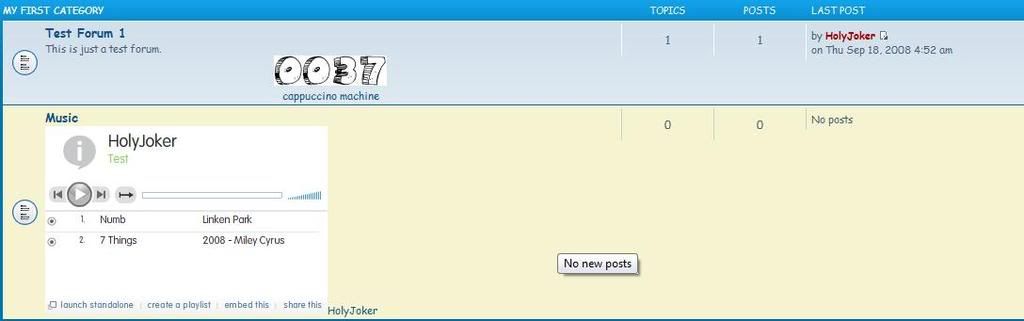
Now go to the index page and it should look like this
To change the height and the width of the player you have to edit the html code.
<object width="300" height="340"><param name="movie" value="http://media.imeem.com/pl/AZO1yEgNFi/aus=false/"></param><param name="wmode" value="transparent"></param><embed src="http://media.imeem.com/pl/AZO1yEgNFi/aus=false/" type="application/x-shockwave-flash" width="300" height="340" wmode="transparent"></embed><a href="http://www.imeem.com/people/Y1IOvL3/playlist/NLVzwNx1/holyjoker_music_playlist/">HolyJoker</a></object>
Find the numbers I colored in your code then change the blue colors to change the width and change the red ones to change the height
Note* You have to put this in the forum description, you can't put it at the bottom of your forum, you need advanced hosting to do this.
Alright, follow these directions to add a music playlist:
Go to http://imeem.com and make a playlist and once you make it go to the playlist
Once you are viewing your playlist in that huge mode go to the bottom of the playlist and look for
Now go to your forum and go to the admin control panel
Once there go to the posting tabs and you should be on the BBcodes page. Click add new BBcode so we can add this playlist
In the BBcode Usage Box put
Code:
[music][/music]In the HTML Replacement Box put the code in that box that i circled in this picture
Leave the helpline empty and hit submit and you should be done
Now go to the manage forums section and make a new forum. In the description of the new forum add
Code:
[music][/music]Now go to the index page and it should look like this
To change the height and the width of the player you have to edit the html code.
<object width="300" height="340"><param name="movie" value="http://media.imeem.com/pl/AZO1yEgNFi/aus=false/"></param><param name="wmode" value="transparent"></param><embed src="http://media.imeem.com/pl/AZO1yEgNFi/aus=false/" type="application/x-shockwave-flash" width="300" height="340" wmode="transparent"></embed><a href="http://www.imeem.com/people/Y1IOvL3/playlist/NLVzwNx1/holyjoker_music_playlist/">HolyJoker</a></object>
Find the numbers I colored in your code then change the blue colors to change the width and change the red ones to change the height


