







Customizing your iDevice - Text

Introduction
Hey guys! I've been considering writing a 2 part guide on customizing your iDevice for a while but everytime I've started writing it I've become busy with other work. Now that I'm on holidays and I'm long overdue to create a guide I thought now is the perfect oppurtunity!
This guide is part of a 2 guide series. I will be showing you a few ways on how to customize the text of your iDevice, including the "Slide to Unlock" text, the text involving your Carrier/Service provider and how to change applications names.
I hope you enjoy it!
Contents
I: Introduction
II: Contents
III: What you will need
IV: Changing text such as "Slide to Unlock"
V: Changing your Carrier/Service Provider text
VI: Changing application names
VII: Final Words
VIII: Thanks to
II: Contents
III: What you will need
IV: Changing text such as "Slide to Unlock"
V: Changing your Carrier/Service Provider text
VI: Changing application names
VII: Final Words
VIII: Thanks to
What you will need
Jailbroken iDevice
Having a jailbroken iDevice opens you up to the software below and much more, allowing you to customize to your hearts desire. I will not be going into details on how to jailbreak your iDevice, but if you do have any queries I'll happily help you out. Please note that according to U.S Law Jailbreaking is legal. However it is important for you to know that jailbreaking your iDevice will void your Apple Warranty. Also, downloading and using any pirated applications is illegal.

Cydia
Cydia is used to download and install all the software you will need in this guide. When you jailbreak your iDevice Cydia is generally installed automatically.

iFile
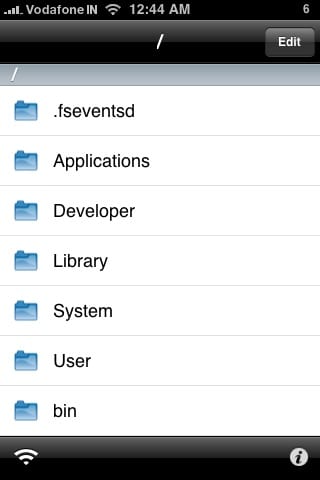
iFile is an application found in Cydia which allows you to customize text on your iDevice inluding the "Slide to Unlock" text and changing application names.
MakeItMine
Last but not least, Make it Mine. Make it Mine allows to customize your Carrier/Service provider text at the top left hand corner of the screen. It is also found in Cydia under "MakeItMine."

Changing text such as "Slide to Unlock"
1. If you haven't already, download and install iFile. To do this go into Cydia and use the search option and search "iFile." The software costs $4.00 but it is certainly worth it. There is a cracked version on Cydia but please remember that downloading and using this is classed as piracy and is illegal.
2. When it's finished installing the iFile application will be put onto your springboard, open it.
3. When it's opened, you'll see a list of folders. To find to the page we need, follow the below navigations.
/ --> System --> Library --> CoreServices --> SpringBoard.app --> English.Iproj --> SpringBoard.strings

4. When you open SpringBoard.strings, you'll see a large wall of text appear. Don't be intimidated! Tap "edit" at the top left hand corner of the screen, then the search button (the small magnifying glass) located at the bottom left hand corner of the screen. Type in "Slide to Unlock."
5. The text we're looking for will be on the screen. Deleted "Slide to Unlock" (Leave the inverted commas) then replace it with the text you want to use. I'll be using "Brendan Here!"
6. Open an application which will allow you to respring your SpringBoard such as Winterboard or SBSettings. (Details on Winterboard will be in part 2.) Respring your iDevice, done!
2. When it's finished installing the iFile application will be put onto your springboard, open it.
3. When it's opened, you'll see a list of folders. To find to the page we need, follow the below navigations.
/ --> System --> Library --> CoreServices --> SpringBoard.app --> English.Iproj --> SpringBoard.strings
4. When you open SpringBoard.strings, you'll see a large wall of text appear. Don't be intimidated! Tap "edit" at the top left hand corner of the screen, then the search button (the small magnifying glass) located at the bottom left hand corner of the screen. Type in "Slide to Unlock."
5. The text we're looking for will be on the screen. Deleted "Slide to Unlock" (Leave the inverted commas) then replace it with the text you want to use. I'll be using "Brendan Here!"
6. Open an application which will allow you to respring your SpringBoard such as Winterboard or SBSettings. (Details on Winterboard will be in part 2.) Respring your iDevice, done!
Changing your Carrier/Service Provider text
1. If you haven't already, download Make it Mine from Cydia just like you did with iFile except search "MakeItMine."
2. When you're done an icon will be put onto your SpringBoard, open it.
3. You'll see a small area for you to type in the text you want your Carrier/service provider to be changed to. You can also change the text for your digital clock in the status bar. You won't need to respring your iDevice to change it, however when clearing your carrier you will.
2. When you're done an icon will be put onto your SpringBoard, open it.
3. You'll see a small area for you to type in the text you want your Carrier/service provider to be changed to. You can also change the text for your digital clock in the status bar. You won't need to respring your iDevice to change it, however when clearing your carrier you will.

Part 3: Changing application names
1. You'll be using iFile for this. Again, if you haven't already download iFile.
2. Open iFile and follow the below navigations to get to the page we're looking for.
/ --> Applications --> (Application you want to change the name of, I'll be using the AppStore) --> English.Iproj --> InfoPlist.strings

3. A page will open up with a single line of text. Like we did earliar, edit the text in the inverted commas to the text you want. In this case, I'll be changing "App Store" to "Downloads."

4. Respring your iDevice again by using Winterboard or SBSettings, done!
2. Open iFile and follow the below navigations to get to the page we're looking for.
/ --> Applications --> (Application you want to change the name of, I'll be using the AppStore) --> English.Iproj --> InfoPlist.strings
3. A page will open up with a single line of text. Like we did earliar, edit the text in the inverted commas to the text you want. In this case, I'll be changing "App Store" to "Downloads."
4. Respring your iDevice again by using Winterboard or SBSettings, done!

Final Words
Thanks for reading my guide! I hope you learnt something new about the customization of iDevices. I'll soon be creating a guide on Customizing the visual aspects of your iDevice which I'll have a link to on here. Happy customizing!
Thanks to:
A couple of School Friends - Jordan and Jack - For helping me Jailbreak my iPod touch and teach me some how to use certain software.
Jay Freeman - Creator of Cydia and JailBreakMe (The method I used to jailbreak my iPod.)
Erica Sadun - Creator of MakeItMine.
Carsten Heinelt - Creator of iFile.
You - For taking the time to read my guide!




 Just remember though, everytime you restore your iDevice to update it is the exact same thing you do to fix it up. Also, all your old stuff is synced onto your itunes too.