




Legend





This is a guide on how to prepare for scammers.
A few quick hints:
I always stick to this list no matter what, I have never been scammed while abiding to this list (or rules if you want).
If you get scammed you always want to get the scammer banned, to do this you need proof.
I will always have all the proof I need for any trade as I keep all the data.
Here is what I mean by keeping the data:
Everyone I have traded with:

Trades with this person:

All screen shots taken while trading:

(above image in detail)

For the best proof you can always video all of your trades.
I would recommend "Camtasia" You can download it here: http://www.techsmith.com/camtasia/?gclid=COG76dD1yacCFQoZ4QoduAHyCw
After you download it, a guide will appear as soon as you open it showing you how to use it.
I recommend backing up all of these files (if you do it like shown) onto an external hard drive or USB. That way if anything happens to your computer, you will still have all the information you need in case of the unfortunate circumstance of a scammer.
How to report scammers:
First off, all reports must be posted here: http://www.sythe.org/forumdisplay.php?f=253
If you want to report a scammer you must follow this template:
Link to scammer's Sythe profile: http://sythe.org/member.php?u=54828
Briefly explain the trade: I sell (items here) and Jei jei KK bought one using paypal, I sent the item straight after payment and have confirmation that he received it.
How they scammed: Charged the cash back.


Proof that you were not talking to an impostor:
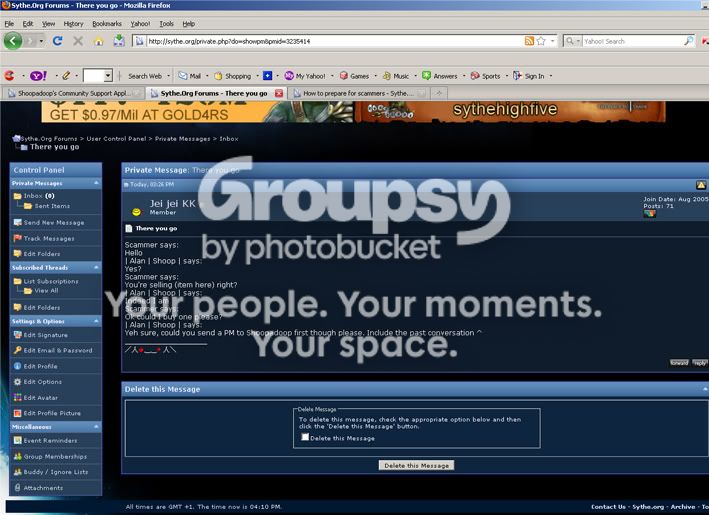
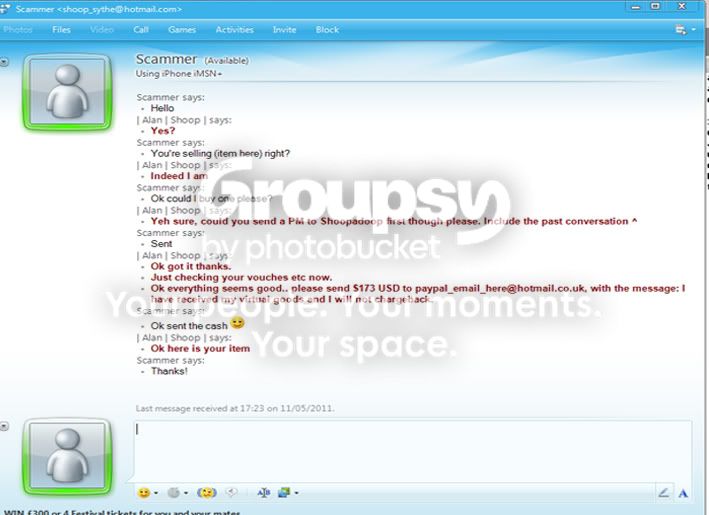
Trade screenshots:
Ok, unfortunately I couldn't actually trade, as it was an inconvenience for the people I was asking. Jei jei KK helped out by providing me with the PM, just to clarify he did no scam me. Your trade screenshots will generally be bigger, it was only that I made the conversation up with myself that I could fit it all in 1 screenshot. The 1 thing you need to give your scammer the ban hammer is proof.
If you follow this guide you should already have every single screenshot needed to successfully report them.
A few quick hints:
- Always check vouches
- If you think it sounds weird then don't trade. Make up your mind to trade or not in the first few minutes of talking.
- If it sounds too good to be true, it probably is.
- Never let anyone convince you to trade.
- Research your trader (Google their email etc.)
- Check his join date and posts (shows how dedicated to Sythe they are)
I always stick to this list no matter what, I have never been scammed while abiding to this list (or rules if you want).
If you get scammed you always want to get the scammer banned, to do this you need proof.
I will always have all the proof I need for any trade as I keep all the data.
Here is what I mean by keeping the data:
Everyone I have traded with:
Trades with this person:
All screen shots taken while trading:
(above image in detail)
For the best proof you can always video all of your trades.
I would recommend "Camtasia" You can download it here: http://www.techsmith.com/camtasia/?gclid=COG76dD1yacCFQoZ4QoduAHyCw
After you download it, a guide will appear as soon as you open it showing you how to use it.
I recommend backing up all of these files (if you do it like shown) onto an external hard drive or USB. That way if anything happens to your computer, you will still have all the information you need in case of the unfortunate circumstance of a scammer.
How to report scammers:
First off, all reports must be posted here: http://www.sythe.org/forumdisplay.php?f=253
If you want to report a scammer you must follow this template:
Link to scammer's Sythe profile:
Briefly explain the trade:
How they scammed:
Proof that you were not talking to an impostor:
Trade screenshots:
Link to scammer's Sythe profile: http://sythe.org/member.php?u=54828
Briefly explain the trade: I sell (items here) and Jei jei KK bought one using paypal, I sent the item straight after payment and have confirmation that he received it.
How they scammed: Charged the cash back.
Proof that you were not talking to an impostor:
Trade screenshots:
Ok, unfortunately I couldn't actually trade, as it was an inconvenience for the people I was asking. Jei jei KK helped out by providing me with the PM, just to clarify he did no scam me. Your trade screenshots will generally be bigger, it was only that I made the conversation up with myself that I could fit it all in 1 screenshot. The 1 thing you need to give your scammer the ban hammer is proof.
If you follow this guide you should already have every single screenshot needed to successfully report them.



 .





