




Introduction
Welcome to my fourth guide! This How-To will show you how to open .jar files in Linux, so this way you'll be able to run RSBot!
Downloading Java
If you wish to run RSBot, you'll need to download it, as RuneScape is powered by Java. So to download Java, first of all, we will need to open our Terminal, which can be found in System Tools > Terminal.
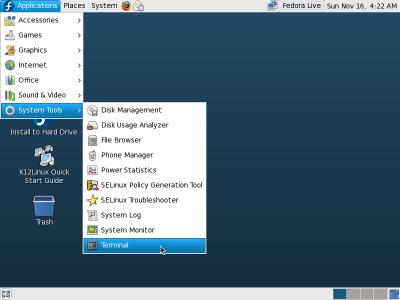
In the terminal, we will type:
Code:
suContinued by your root password. This way you have the superuser's powers.

Now we must type:
Code:
yum install javaYou must accept everything that is asked and wait for about 4-5 minutes. Then you will have Java installed! Now we can move on to downloading our bot.
Downloading the bot
Now we must choose which bot we want to download. I recomend you RSBot.org's bot.
RSBot.org
For RSBot download...

We now have the bot downloaded!
Opening our bot
Now we reach to the final part! We need to find where our file was downloaded. It's normally in Downloads folder, so what we need to do is type this in our Terminal.
Code:
cd DownloadsNow our Terminal is in Downloads folder.
Now what we need to do is check the bot's name. So we go on our Downloads folder. Normally RSBot's file name is RSBot.jar or RSBot-116.jar <- 116 or whichever version. I
Check the picture:

Now we have everything renamed, we can finally open our bots! Type this in your Terminal.
Code:
java -jar ./RSBot-xxx.jarUse this code if your bot is RSBot-xxx.jar. If you renamed your RSBot to "Bot.jar", then you should type:
Code:
java -jar ./bot.jarOur bot will pop up in 5-10 seconds! It wasn't that hard wasn't it?
Quick Picture

Please post if I have any grammar/spelling mistake! I'm studying English, so you'll help me improve it too! Also, if you have any suggestions, post away!