• Log in or sign up for an account here: https://www.sythe.org/login

HELP! HELP! My Backdoor virus ruined my computer

SmallKid

Apprentice
Joined
Jul 4, 2012
Sythe Gold
0
Messages
639
Location
London, England
HELP! My computer just got ruined.
My computer is now looking like windows classic or 95/97 I can't system restore OR connect to the Internet. This is from my phone.

I just scanned malwarebytes and it says I have backdoor, system registry virus. I just determine it and took a screenshare but I can't share with u cos there is no Internet.

Please how to I turn it back to windows 7? How to I do it? System restore doesn't work and so doesn't the Internet. Help
 
<3 n4n0
Easter 2013
well the windows classic look that you are talking about can be changed by reenabling the windows basic theme by right clicking your background and clicking personalize. Try doing a system restore by booting from your recovery cd!
 
Sythe RSPS Player
Sythe Awards 2012 Winner
PHP Shit Show 2k26
St. Patrick's Day 2013
Sythe's 10th Anniversary
There should be an option there to remove the virus from Malwarebytes. The computer has always been Windows 7, it's just the theme (the look) of the menu has been changed, however I would get the virus problem fixed first before worrying about secondary problems like the theme. I think you might have just started up in safe mode, which is essentially a mode where only Windows processes start up, nothing else. Restart the computer after playing around with Malwarebytes, and then see if any options seen to appear on start-up.

It might be wise to consider a format of Windows.
 
I can't start safe mode because I think the virus blocked all keyboard use when i'm in that type of menu.

Won't let me do system restore.

Would it be an option to reset the hard drive?
How do I do that?
 
Sythe RSPS Player
Sythe Awards 2012 Winner
PHP Shit Show 2k26
St. Patrick's Day 2013
Sythe's 10th Anniversary
I don't think the virus can do anything at that stage, try plugging the keyboard into a different port and see if it works then. If you can get it to work, hit Safe Mode with Networking.

You don't need to change the hard drive, what I would recommend is a system format if you wanted to do something hassle free. If you still have the Windows disk that came with it, then you could try repairing or just installing a new copy of Windows onto it.
 
I hardly know anything about computers, a close friend sold the desktop to me.

I can't connect to the Internet at all.
When you said it can't do anything at that stage, are you saying it didn't cut off keyboard access on the menu?

So if I find the disk, I can reset the computer? By the way, what will installing a new Windows do exactly?
 
Sythe RSPS Player
Sythe Awards 2012 Winner
PHP Shit Show 2k26
St. Patrick's Day 2013
Sythe's 10th Anniversary
If you don't know a lot about computers, it may be wise to find someone who does.

When I said at that stage, I did mean the menu where it has all the start-up options, I don't think viruses can do anything at that stage and only become operational after logging on.

If you find the disk, then great. Installing a new Windows is basically wiping everything, and then installing a new version of Windows so it's like new. If you have things you want to back up, this may be of a hassle. Although if your friend sold you the desktop, I'm not sure if he gave you a disk for it also.
 
He's my sister boyfriend, yes he probably has the disk. I might wait till he comes.

Can someone explain how the cd works? All I know is that it resets.

How long would it take to reset?
 
Sythe RSPS Player
Sythe Awards 2012 Winner
PHP Shit Show 2k26
St. Patrick's Day 2013
Sythe's 10th Anniversary
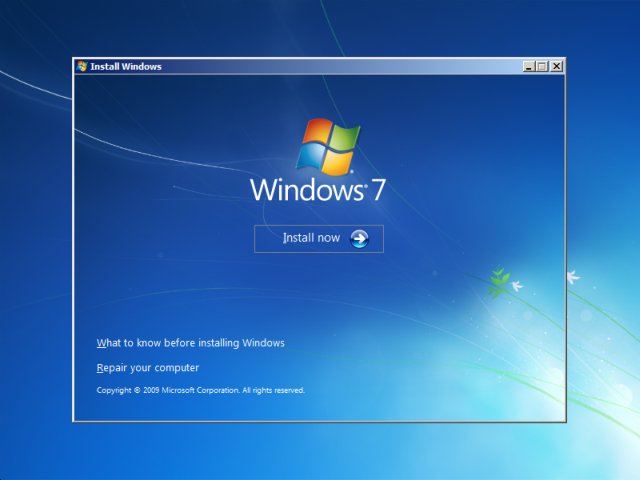
The CD is essentially a Windows installation disk, you insert and it and you then boot up off it, this is really easy to do. After you boot off it, you go through the options for formatting/installing and then let it install. The time varies depending on the computer but it's usually around 20 mins - half an hour.
 
The CD is essentially a Windows installation disk, you insert and it and you then boot up off it, this is really easy to do. After you boot off it, you go through the options for formatting/installing and then let it install. The time varies depending on the computer but it's usually around 20 mins - half an hour.

Also a side note, if you cannot boot up. try booting from CD. if you need help on how to do that, just let me know.
 
Do you have another computer that you can use/ burn cd's to? If so, then google Hirens Boot CD. Download it and burn it to a disk. From there insert the disk into your messed up computer, and change the computer to boot from cd instead of the hard drive within the bios. Then with the cd as the primary boot option, let it boot up.

This cd allows you do do all sorts of things, such as run antivirus scans, reformat your hard drive, and loads of other things. If you have any more q's PM me :)!

EDIT: I had to use this when my computer was being screwed with by some rootkit. I couldnt do anything. But now my computer is good as new :)
 
Can the virus possibly not allow keyboard functions when I put the recovery CD in? Can it block the recovery CD from being used? When I put the CD in will it automatically go to recovery mode or will I have do go on desktop and open in manually? If it's manually van the backdoor virus block it?

Any more information about recovery disk and how it works when I put it in? I can't use keyboard when I'm on the black and gray menu, will this happen with the recovery CD?
 
Sythe RSPS Player
Sythe Awards 2012 Winner
PHP Shit Show 2k26
St. Patrick's Day 2013
Sythe's 10th Anniversary
No, I don't believe a virus can stop anything like that before Windows has actually booted up.

As for the CD, you need to boot off that rather than your hard drive. Upon start up, you will see along the top or bottom 'press F12 to go to quick boot' or 'press F2 to go to setup', you would need to go to quick boot and press the CD drive option. You would then need to press a random key to tell your computer to boot off it, and then wait for it all to load up and then follow the on-screen instructions. There's many videos on You-Tube of it being done.
 
Ok thanks.

But when I try to run it in safe mode, I press F8 lots of times, and it takes me to the menu. Then I can't press anything. Wouldn't this happen with the CD?
 
Sythe RSPS Player
Sythe Awards 2012 Winner
PHP Shit Show 2k26
St. Patrick's Day 2013
Sythe's 10th Anniversary
It does to that on regular occurrences me. I just plug it into a different port or use a different keyboard. I doubt it would happen with the CD, if it does then you can just take it out and plug it back in again.
 
Runescape Gamblingrunescape gambling
Back
Top