







1st place:

2nd place:

3rd place:

Random participant raffle (x3 winners!):







STEP ONE:
Select an image you would like to use for your minirank design and save it to your computer.
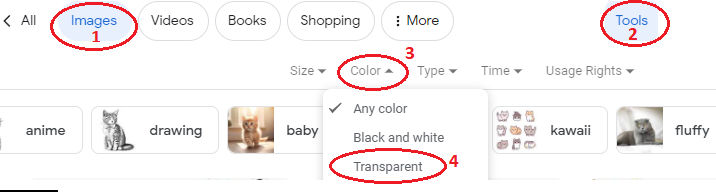
The easiest way to select an image for this competition is to use google image search to look for images that are already transparent.
Google image → Tools → Color → Transparent
If the image you've selected is not transparent, you can upload your image to remove.bg and save the updated image to your computer.
STEP TWO:
Resize your image. (Must be exactly 32x32 pixels)
You can upload your image to http://www.online-image-editor.com/ to resize your image and add the last two digits of the year into the bottom right corner of the image, then save your image.
STEP THREE:
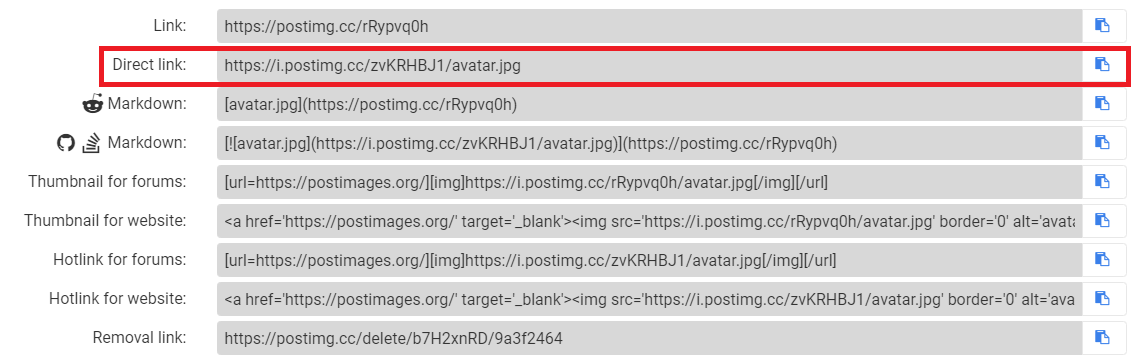
Upload your final design onto Postimages — free image hosting / image upload and copy the "DIRECT LINK"

STEP FOUR:
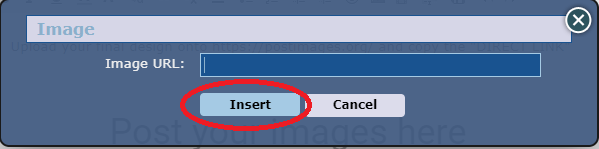
Go to sythe.org and select the "Image" button in the comment tools, and paste the direct link. Click "Insert" and your image should appear in the comment box.

Select an image you would like to use for your minirank design and save it to your computer.
The easiest way to select an image for this competition is to use google image search to look for images that are already transparent.
Google image → Tools → Color → Transparent
If the image you've selected is not transparent, you can upload your image to remove.bg and save the updated image to your computer.
STEP TWO:
Resize your image. (Must be exactly 32x32 pixels)
You can upload your image to http://www.online-image-editor.com/ to resize your image and add the last two digits of the year into the bottom right corner of the image, then save your image.
STEP THREE:
Upload your final design onto Postimages — free image hosting / image upload and copy the "DIRECT LINK"
STEP FOUR:
Go to sythe.org and select the "Image" button in the comment tools, and paste the direct link. Click "Insert" and your image should appear in the comment box.

The Community Development Team will select the top 10 entries.
After that, 3 winners will be voted on by YOU, the community!
Be sure to put your skills to the test in this year's other event here:
Easter Egg Hunt
Last edited:













 Was pretty hard to try figure out lmao.