• Log in or sign up for an account here: https://www.sythe.org/login

Computer "artifacting"

The T Virus

Active Member
Joined
Apr 6, 2012
Sythe Gold
3
Messages
108
for those of you who know what this is, its pretty damn annoying, only really happens when im playing graphics intensive games like LoL and WoW, Never had it happen on rs.

But i just sent my AMD video card in thinking that was the problem, they replaced it and it still happens, its far better than it was, but is still happening, it used to happen, then everything would pixelate and white squares and my cmp would blue screen crash, not it just kind of has some wacky lines on the screen every few seconds.

it also will occasionally say "display driver has stopped working but has recovered" making me wonder if i need to driver wipe and re-install.

anyone have some suggestions on this?
 
for those of you who know what this is, its pretty damn annoying, only really happens when im playing graphics intensive games like LoL and WoW, Never had it happen on rs.

But i just sent my AMD video card in thinking that was the problem, they replaced it and it still happens, its far better than it was, but is still happening, it used to happen, then everything would pixelate and white squares and my cmp would blue screen crash, not it just kind of has some wacky lines on the screen every few seconds.

it also will occasionally say "display driver has stopped working but has recovered" making me wonder if i need to driver wipe and re-install.

anyone have some suggestions on this?

Couple of questions, does it happen ONLY when playing graphic intensive games, what is your Power supply, and what kind of card temperatures do you have?

I know a lot of the time it is caused by GPU overheating.
 
Couple of questions, does it happen ONLY when playing graphic intensive games, what is your Power supply, and what kind of card temperatures do you have?

I know a lot of the time it is caused by GPU overheating.

yeah pretty much only when i play graphics intensive games. like right now nothing happens because i have nothing up in the background. Not sure on my power supply, i was thinking that too that i possibly needed a more powerful one.
 
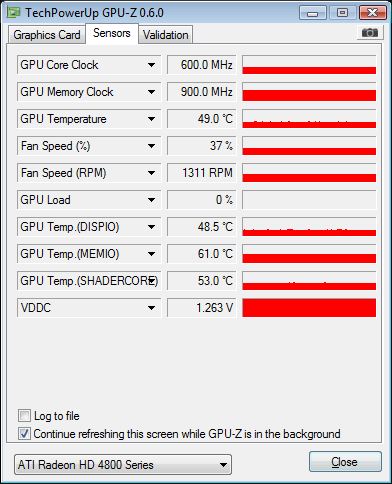
GPU-Z

Could you please download that and let me know the temperatures that you are seeing? Like I said, temperature is a main cause of this problem.
 
f2m.png


seems to be running quite hot. if im thinking correctly.

any suggestions?
 
f2m.png


seems to be running quite hot. if im thinking correctly.

any suggestions?

49c is not hot, especially on the old 4800 series of cards. You should post temps under load, run something like 3d mark or your games, and see what the temp jumps to then. If it stays below 80c then that's not the issue. It could be voltage leaking due to a poor quality card (yes even the replacement may be poor quality/refurbished) or perhaps your PSU is not powerful enough to keep it running under stress.
 
49c is not hot, especially on the old 4800 series of cards. You should post temps under load, run something like 3d mark or your games, and see what the temp jumps to then. If it stays below 80c then that's not the issue. It could be voltage leaking due to a poor quality card (yes even the replacement may be poor quality/refurbished) or perhaps your PSU is not powerful enough to keep it running under stress.

^This exactly, try running the same monitor under a load. If it has been happening ever since you got the machine then it is more than likely a bad card or poor PSU. If it just started happening then I would say you might have to replace the card or HOPEFULLY it is just some outdated drivers. Heres a list of what I would do:

1. Check your airflow. Clean out the rig and blow the dust out this will more than likely fix any heat problems if there are any.

2. If it just started happening check your drivers and make sure they are up to date, if they are it might be the card itself that needs replacing.

3. Make sure the psu has the power to support the components.
 
My desktop GPU can run up to 45c idle, which is fine(before anyone asks, I live in Australia and it gets rather hot in the summer. :P).

Get your load temps, open up your PC and get the PSU details(should be a sticker on the side.). Could try putting some fans on your sidepanel as intake if your case supports it, or just a deskfan or something blowing over your PC without the sidepanel. Check for dust.

Also like Fredecus said, could just be your GPU dying, which if you can confirm that you could try the oven method(http://www.overclock.net/t/623774/guide-total-noobs-guide-to-baking-a-gpu)
 
I don't know why it hasn't been mentioned, but your fan is at 37%, turn it up and that'll reduce the heat!

Since it's not completely dead, baking it would be wreckless in my opinion as it's only a temporary fix and would only cause more damage if anything.

Your choices are to underclock it to prevent artifacts or turn up the fan and then your volume to drown out that helicopter in your computer.
 
Runescape Gamblingrunescape gambling
Back
Top