




- Joined
- Sep 20, 2013
- Sythe Gold
- 452
- Messages
- 7,717


Features:
1. Zero Bans, Zero Black Marks: Rigorously tested in VMs for thousands of hours worth of gameplay, with many 99s achieved.
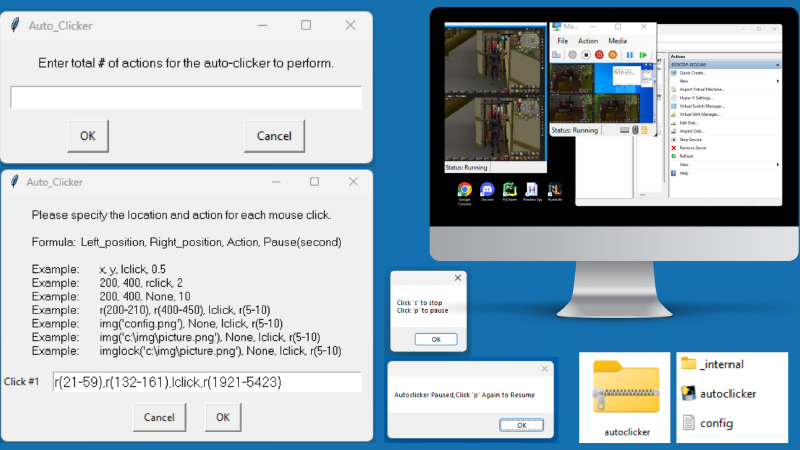
2. Customize To Your Preferences: You're in control and can define the number of actions/clicks you wish to make, customized through the interface or configuration file. Perform a single click or a lengthy list of actions.
3. Easy Configuration: Input your actions manually from the interface or load the configurations quickly via a user-friendly config file.
4. Variable Randomization: Randomization of variables is a basic requirement to botting. This script adds a human-element allowing you to randomize variables, from click location to timing, ensuring every action is unique.
5. Image Recognition: The Autoclicker supports image recognition, set to a high confidence level, ensuring click accuracy and precision.
Autoclicker provides the ability to pause/resume or exit the script anytime by simply pressing your keyboard. Since the Autoclicker is tailored to your settings the the uses for it are endless, the only limitation is your creativity.
1.) Question: Can I get banned?
Answer:
Answer:
Answer:
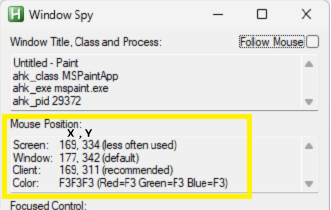
4.) Question: How do I locate the x, y mouse positions?
Answer:
*Running this script will require you download the latest version of Python.
Answer:
- If used correctly you will not, however just like any tool, its performance depends on how you use it. To avoid bans, set a reasonable pause speed between actions similar to human clicking. Rapid clicks per second that are unattainable even with randomized locations can raise red flags. Always ask yourself, "What would a human do?" and adjust your settings accordingly. Using "r()" = random; for location and time it is highly advised to use this setting.
Answer:
- Place the image you want to recognize into the Autoclicker folder, where the .exe and config.txt file are located.
- To get an image use the keyboard shortcut "Ctrl+Shift+S" and highlight the image you want to recognize, creating a copy.
- Paste the copied image into a program like Paint and use the selector tool to crop the image to a smaller, easier to recognize size. This will help with image detection.
- The confidence level for image recognition is set to > 90%, ensuring accuracy before executing the next action.
Answer:
- Variables (x/y/pause #) can be entered as a single number or range "r()" of numbers. Locations can also be identified using image recognition.
- Left_Position = X variable
- Right_Position = Y Variable
- Click Action = lclick (left click) or rclick (right click) or none
- Pause = # of seconds between each click
4.) Question: How do I locate the x, y mouse positions?
Answer:
- To determine the x, y mouse positions, you can use "Window Spy", a utility program included with AutoHotkey (https://www.autohotkey.com ). Window Spy provides various information about your screen, including the mouse position represented as x, y coordinates. This allows you to precisely identify the mouse's location on the screen.
*Running this script will require you download the latest version of Python.
Price: $35 or 07*
(Will Accept Unregistered Staker*)
Last edited:


