
• Log in or sign up for an account here: https://www.sythe.org/login

Introduction to Mechanical Keyboards

Darkest Dream

I prefer to have my nightmares with open eyes.

Darkest Dream Donor
Joined
Jun 26, 2013
Sythe Gold
544
Messages
7,457
Location
Community Development
Sythe Awards 2015 Winner
Sythe RSPS Player
Two Factor Authentication User
In Memory of Jon
Christmas 2015
Doge
Halloween 2013
Sythe's 10th Anniversary
Off Topic Participant
Gohan has AIDS
Heidy
Lawrence
Hello, this is a brief introduction to mechanical keyboards. It is intended for people who have never used or owned one. I'll provide a brief FAQ and other resources.

​
FAQ:​


What is a mechanical keyboard?

Essentially a mechanical keyboard is a keyboard with individual switches beneath every key.

Why would I want one?

Most keyboards these days have rubber domes under the keys and generally poor build quality. The key kind of collapses under your fingers and provides a mushy and overall unsatisfying experience. They're what you're probably used to, so you can't really notice the difference until you try mechanical.

Mechanical keyboards are usually sturdier with an overall higher build quality. There are many different types of switches to choose from, leading to a lot a more customized experience.

You're able to choose how much resistance you feel when pressing down on a key. This is referred to as 'actuation force' and later in this guide it'll be referring to it as such. You can choose between very light, moderate, heavy, or very heavy.

Whether you want tactile feedback during a key press. Basically tactile feedback lets you feel a tiny 'bump' when pressing down a key to let you know you've activated it without pushing it all the way to the bottom. 'Bottoming out' can fatigue you faster and slow down your typing speed. You can opt for tactile feedback or none.

Whether you want to hear an audible click upon key activation. This is really personal preference, but typing can become quite loud. So don't choose this option if you're in a place where you might annoy others like an office or a dorm room.

They often come with options such as adjustable back lighting, programmable macro shortcuts, different cable routing options, faster detection of key presses, and registering many key presses at the same time. You can also switch out the keys easily to clean, replace, or use custom ones in certain areas.

Who are they for?

They're for anyone who spends more than at least a couple hours a day at a desk. Typing, or gaming.

If you're only at a desk for less than an hour to stream media or check your emails, its probably not worth it for you.


Price?

Mechanical keyboards are more costly than regular keyboards.

While a regular keyboard usually costs $20-40. A mechanical keyboard will usually run you between $75 - $200. They can be found for cheaper in some cases.

Are they worth it?

I definitely think so!

Your keyboard can last you for years and many millions of key presses. They don't wear out for a long time.


Choosing a keyboard:

Before you pick a keyboard, you'll need to pick the type of switch that you want. This is really the hardest part.

In this guide I'll only be focusing on cherry MX key switches, although there are other brands of switches.

Red
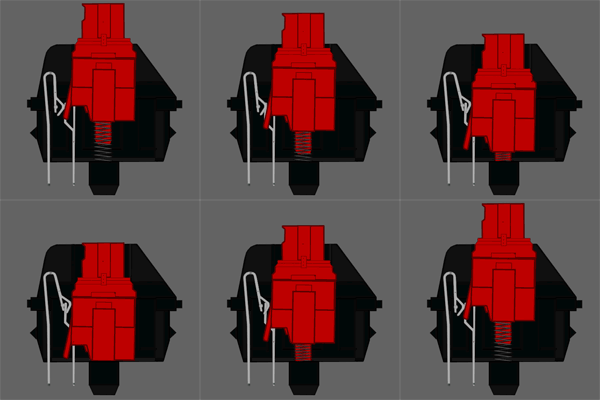
Red.gif


*Low actuation force.
*No tactical feedback
*No audible click


Pro: Can be very good for gaming as you'll be able to press the key down very quickly over and over. Can be good for people who type lightly.

Subjective con: May not be as good as other switches for programming, or typing for long periods of time. This is due to lack of tactile or audible feedback. Still can be used for that if you like them enough


Black
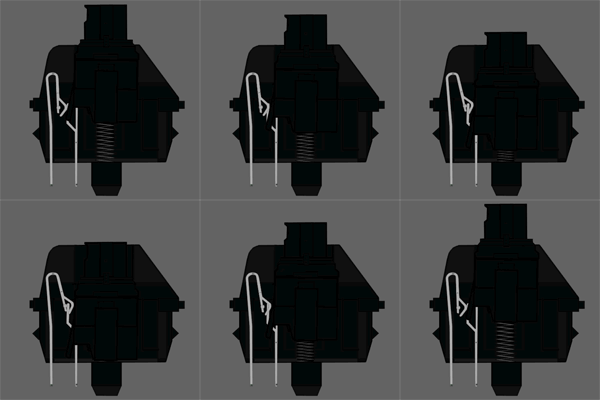
Black.gif


*High actuation force
*no tactical feedback
*no audible click


Pro: Also good for gaming as the stiff spring will reset the key quickly. Its usually used as a stiffer alternative to red for gaming, or in enterprise environments to lower any accidental key presses.

Subjective con: May not be as good as other switches for programming, or typing for long periods of time. This is due to lack of audible or tactile feedback, as well as high actuation force. Still can be used for that if you like them though.


Brown
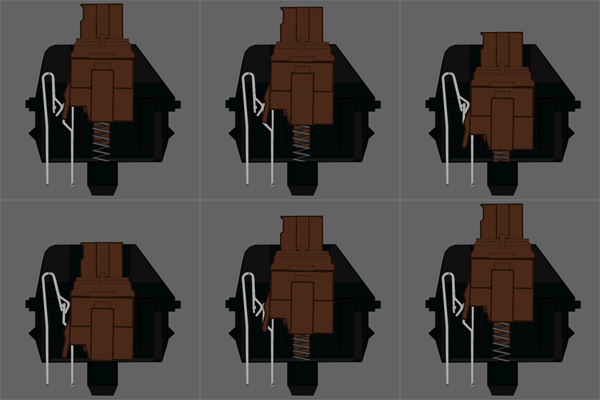
Brown.gif


*Medium actuation force
*Has tactile feedback, you'll feel a slight bump when pressing down.
*No audible click


Pro: Good middle of the road keyboard. Good for typing long things or 95% of gaming.

Subjective con: May not be as great as reds or blacks for certain games where you have to press the same key quickly over and over. No audible feedback.


Blue
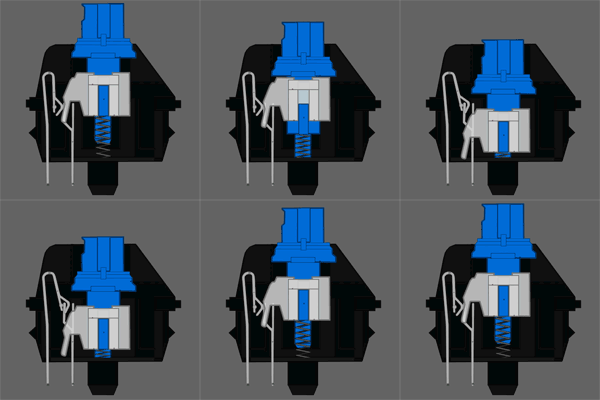
Blue.gif


*Medium to high actuation force
*Has tactile feedback, you'll feel a slight bump when pressing down
*Has audible click when activated


Pro: Great for typing a lot or programming.

Subjective con: Not suitable for shared spaces if you're worried about annoying people with your typing. Not very suitable for gaming, as double tapping a key can be more difficult than other switches


Other
There are also less common ones that I'll only mention briefly, but may be worth looking into if they appeal to you.


"Clear switches are a stiffer version of Brown switches, with a tactile bump and weighting of 65 cN.
Grey switches are used for space bars on Clear keyboards, with a weighting of 80 cN.
Green switches are a stiffer version of Blue switches, with a tactile bump and audible click, weighted at 80 cN. It is primarily used for space bars.
White switches are very similar to green switches, with modern versions being weighted the same (80 cN) but being slightly quieter.
Super Black switches are extra stiff (150 cN) linear switches designed for space bars on keyboards with Black switches.
Dark Grey switches are moderately more stiff linear (80 cN) switches designed for use as space bars on keyboards with Cherry MX Black switches.
Cherry MX Lock switches are locking linear switches that stay down until pressed again, typically used for Caps Lock and TTY lock in keyboards before the 1980s."

There are also many non-cherry MX switches out there.

Razer switches: The Razer Keyboard Technology
Topre switches: Topre switch - Deskthority wiki
List of many others: Category:List of all keyboard switches - Deskthority wiki


Can't decide?

That's a common problem, its hard to make a choice when money is involved.

Usually you can go into computer shops and sample some. There are also kits that you can order online that have one of each key for you to try out.


Where to order?

Up to you, there are plenty of places online and in retail stores to choose from. A quick google search will get you what you're looking for.

What brand?

Also up to you. Consider the switch type, look, features, and warranty. What's available is always changing, so exhaustively reviewing certain brands wouldn't be worth it.


What do you use?

I use a ducky shine 3 with cherry mx browns.

I'm not specifically recommending it, but that's what I settled on when I decided to purchase my first.
​


I'll be working on the layout and typos. If you have any questions feel free to contact me!​
 
Last edited:
I actually use the Ducky Cherry MX Browns. Been in love for the past year.
 
Sythe Awards 2015 Winner
Sythe RSPS Player
Two Factor Authentication User
In Memory of Jon
Christmas 2015
Doge
Halloween 2013
Sythe's 10th Anniversary
Off Topic Participant
Gohan has AIDS
Heidy
Lawrence
I actually use the Ducky Cherry MX Browns. Been in love for the past year.

Same, no complaints here.

The WASD swapped out for orange looks really sweet.

I put mine on highest brightness, static lighting.

2 random LED's we're out when it arrived from the factory, but I didn't care enough to warranty it though NCIX.
 
Valentine's Singing Competition Winner
Sythe Awards 2015 Winner
Sythe Awards 2016 Winner
Sythe Awards 2020 Winner
Member of the Month Winner
MushyMuncher
Gohan has AIDS
Extreme Homosex
World War 3
I'm LAAAAAAAME
Discord Verified
Off Topic Participant
clack clack clack clack clack clack clack clack clack clack clack clack clack clack clack clack clack clack clack clack clack clack clack clack clack clack clack clack clack clack clack clack clack clack clack clack clack clack clack clack clack clack clack clack clack clack clack clack clack clack clack clack clack clack clack clack clack clack clack clack clack clack clack clack clack clack clack clack clack clack clack clack clack clack clack clack clack clack clack clack clack clack clack clack clack clack clack clack clack clack clack clack clack clack clack clack clack clack clack clack clack clack clack clack clack clack clack clack clack clack clack clack clack clack clack clack clack


I've actually been to a few game development jams where people use old-ass mech keyboards from the 90s with those fat plugs. Totally loved the sounds of those boards all damn weekend.
 
Same, no complaints here.

The WASD swapped out for orange looks really sweet.

I put mine on highest brightness, static lighting.

2 random LED's we're out when it arrived from the factory, but I didn't care enough to warranty it though NCIX.

I didn't really like the orange switches for the WASD, but mine came with all lights fully functioning. The way they programmed the spacebar ligth is pretty ass, I just have mine fully red like the rest of my keyboard.
 
Former OMM
Gracious
Detective
In Memory of Jon
Official LoL Rank Verifier
Verified Diamond
STEVE
Poképedia
Discord Verified
Sythe Awards 2016 Winner
Steam Account Verifier
Sythe RSPS Player
DIAF
Twitter
Paper Trading Competition Participant
Facebook Promoter
Two Factor Authentication User
SytheSteamer
I use the Razer Blackwidow myself, and it has proven to be very good so far. Have it for almost 2 years now, no clue what type of keys they are. I must say they are very loud but that doesn't bother me at all.
 
I use the Razer Blackwidow myself, and it has proven to be very good so far. Have it for almost 2 years now, no clue what type of keys they are. I must say they are very loud but that doesn't bother me at all.

When I type at 120wpm my shit gets sooooooooo loud lol. People complain all the fucking time, but I love it.
 
Sythe Awards 2015 Winner
Sythe RSPS Player
Two Factor Authentication User
In Memory of Jon
Christmas 2015
Doge
Halloween 2013
Sythe's 10th Anniversary
Off Topic Participant
Gohan has AIDS
Heidy
Lawrence
I use the Razer Blackwidow myself, and it has proven to be very good so far. Have it for almost 2 years now, no clue what type of keys they are. I must say they are very loud but that doesn't bother me at all.

Sounds like they're roughly either cherry mx red or blue equivalents.

If you have the 'clicky' version its supposed to. If you have the 'silent' version you may be bottoming out your keys too often.
 
Sythe Awards 2010 Winner
Sythe Awards 2012 Winner
Christmas 2015
Valentine's Day 2016
Easter 2016
MushyMuncher
Tier 1 Prizebox
A very good newcomers guide to Mechanical keyboards.

I purchased a new keyboard about a month and a half ago, along with a brand new PC. I'd always used membrane keyboards, but most of my gaming friends do use Mechanical. I tried their keyboards and quite honestly I could not get used to it. It felt very unnatural, so I decided to purchase a new membrane instead.

Did you anyone else ever experience difficulty getting used to theirs?
 
Christmas 2015
I went to my friends house and tried his Razer Black Widow. I loved it until i tried gaming i wasnt use to the m1, m2, m3, etc. keys. I always found myself getting confused on where my hand placements was but i felt like i could get use to it. I also loved how load it was ;p
 
Sythe Awards 2015 Winner
Sythe RSPS Player
Two Factor Authentication User
In Memory of Jon
Christmas 2015
Doge
Halloween 2013
Sythe's 10th Anniversary
Off Topic Participant
Gohan has AIDS
Heidy
Lawrence
A very good newcomers guide to Mechanical keyboards.

I purchased a new keyboard about a month and a half ago, along with a brand new PC. I'd always used membrane keyboards, but most of my gaming friends do use Mechanical. I tried their keyboards and quite honestly I could not get used to it. It felt very unnatural, so I decided to purchase a new membrane instead.

Did you anyone else ever experience difficulty getting used to theirs?

Thanks!

I'd definitely recommend trying other mechanical switches. The difference between them is huge.

I'm pretty sure you'd get used to whatever you chose within a day or two.
 
<3 n4n0
Discord Verified
Two Factor Authentication User
Community Participant
Spam Forum Participant
Sythe's 10th Anniversary
Sythe Awards 2011 Winner
I use Browns. I want to try reds. I tried blues and didn't like them so I gave it to my brother. I've also tried clears and jesus christ my fingers were going to fall off.
 
<3 n4n0
Discord Verified
Two Factor Authentication User
Community Participant
Spam Forum Participant
Sythe's 10th Anniversary
Sythe Awards 2011 Winner
A very good newcomers guide to Mechanical keyboards.

I purchased a new keyboard about a month and a half ago, along with a brand new PC. I'd always used membrane keyboards, but most of my gaming friends do use Mechanical. I tried their keyboards and quite honestly I could not get used to it. It felt very unnatural, so I decided to purchase a new membrane instead.

Did you anyone else ever experience difficulty getting used to theirs?

I had basically the opposite experience. I bought my first brown keyboard, used it for like 2 minutes, tried the old membrane keyboard and I couldn't deal with it and my hands hurt.
 
Haunter
Poképedia
Charmeleon
Tier 1 Prizebox
Live Streamer
Red Lizard
Green Flower
Pokémon Trainer
The Dark Side
Yellow rat
Abra
Oktoberfest 2013
Blue Turtle
MushyMuncher
Gastly
Rupee
St. Patrick's Day 2013
Poker Chip
Not sure if srs or just newfag...
Ninja
Tortoise Penis
DIAF
St. Patrick's Day 2014
Cool Kid
Cook
Heidy
Halloween 2013
Village Drunk
Voluntaryist
We Are Legion
Got the ducky shine 4 with the clear switches, and used to have the blackwidow 2013 edition. Definitely liking the clears a lot more.

For me the tactile and audible click from a mech is sooooo soothing and gratifying.
 
Sythe Awards 2010 Winner
Sythe Awards 2012 Winner
Christmas 2015
Valentine's Day 2016
Easter 2016
MushyMuncher
Tier 1 Prizebox
Thanks!

I'd definitely recommend trying other mechanical switches. The difference between them is huge.

I'm pretty sure you'd get used to whatever you chose within a day or two.

I had basically the opposite experience. I bought my first brown keyboard, used it for like 2 minutes, tried the old membrane keyboard and I couldn't deal with it and my hands hurt.

I believe i used browns, which seems to be one of the more popular options. Would you say reds are the most similar to a membrane?
 
Sythe Awards 2015 Winner
Sythe RSPS Player
Two Factor Authentication User
In Memory of Jon
Christmas 2015
Doge
Halloween 2013
Sythe's 10th Anniversary
Off Topic Participant
Gohan has AIDS
Heidy
Lawrence
I believe i used browns, which seems to be one of the more popular options. Would you say reds are the most similar to a membrane?

If you're looking for a combination of membrane and mechanical check out topre. Its more expensive but may be what you're after.

Don't be afraid to spend a few days with a regular mechanical keyboard though, I think you'll be surprised how it grows on you :)
 
got the quickfire tk blue switches

improved my sythe experience tenfold tbh
 
I actually use the Ducky Cherry MX Browns. Been in love for the past year.

Me too, I use CM Storm. I'm in need of a new keyboard though, 3 of my keys are broken (I've had the keyboard for 2 years now, not that long.. but still).
 
I am a programmer/gamer. I don't mind my keyboard terribly much, but as you stated you don't miss what you haven't had. I need something I can type quickly and accurately on.
 
Sythe Awards 2015 Winner
Sythe RSPS Player
Two Factor Authentication User
In Memory of Jon
Christmas 2015
Doge
Halloween 2013
Sythe's 10th Anniversary
Off Topic Participant
Gohan has AIDS
Heidy
Lawrence
I am a programmer/gamer. I don't mind my keyboard terribly much, but as you stated you don't miss what you haven't had. I need something I can type quickly and accurately on.

Just my opinions

Programming = Blues

Either = Browns

Gaming = Reds


Of course you can game on blues and program on reds, some people do.
 
Runescape Gamblingrunescape gambling
Back
Top