



This is a guide for those who did click 'run' java  or in my case didnt but got the virus anyway! I am writing this guide as a result of getting hacked.. pretty stupid on my part and i know its my own fault.
This guide was done on windows 7, i will mention minor differences for XP whilst going through it but i have never used vista and therefore can't comment about that.. i'm pretty sure its the same as the windows 7 way though. anyway here goes:
step 1:
first you're going to want to go to your desktop, best to do this with minimal programs running so you can do this as quickly as possible.
step 2: Click on your start menu, and in the search bar type, "msconfig"(on XP, use "run.." and type the same thing). this is shown clearly in the picture below:

step 3: a window will pop up which is the microsoft startup configuration, do not fiddle with any of the settings in here as you could end up doing some damage and I am in no way liable for that As shown in the picture below click the startup tab:

step 4: in the list, one of the items will have a dodgey name or a replica name to that of a system 32 file,also the manufacturer will be "unknown." At this point you must realise that anything in this list you disable will not effect your computer dramatically. as you can see on mine the only things i have on startup are my wireless adapter and my antivirus just so i don't have to start them up manually. Anyway back to the dodgey file... this file is the file you want to delete, hover other the path and either use your memory or write the path down.
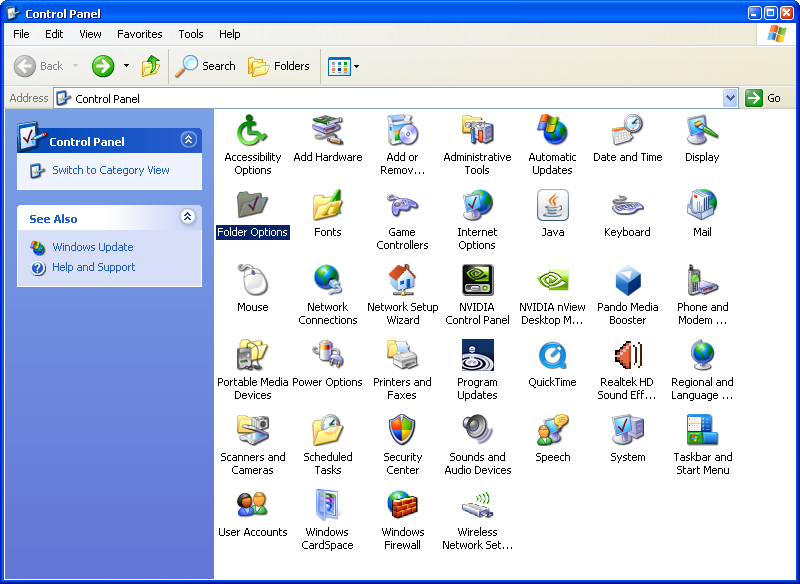
Step 5: You need to follow this path and delete the program at the end which will be a .exe program. Sometimes whilst following the path you may not see one of the folders stated, this is because its a hidden folder to see this you must go to start and open control panel, then go to appearances and personalisation(for XP please PM me for alternative route for this):

Step 6: A window will popup called folder options simply find in the list the hidden files and folders section and check the statement that says,"Show hidden files, folders and drives." This is shown below:

Step 7: When you have shown hidden folders and followed the path, you will find a folder which holds a .exe program which has something to do with Java, i have had many with strange names such as: "MerchantGuide.exe","Javaload.exe","AutoBot.exe" This is the file you want to delete: so richt click and click delete.. DON'T FORGET TO EMPTY YOUR RECYCLE BIN AFTER AS WELL!the picture below shows an example:

Step 8: It should all be deleted now but quickly search the name of the corrupt file you have just deleted in the search box again, incase it has replicated, if it has simply delete at the other location too and empty your recycle bin again.
So that is my guide to those of you silly enough to have clicked run on the java application or like me got the virus anyway. If somebody disagrees with this guide or thinks this doesnt delete the virus please let me know but i have a pretty good knowledge of computers and think this is a 99% concrete way of getting rid of the virus. It has worked for me a few times as i did not have antivirus for a while.
Thanks for reading, hope it helps and good luck getting rid of those viruses.
or in my case didnt but got the virus anyway! I am writing this guide as a result of getting hacked.. pretty stupid on my part and i know its my own fault.This guide was done on windows 7, i will mention minor differences for XP whilst going through it but i have never used vista and therefore can't comment about that.. i'm pretty sure its the same as the windows 7 way though. anyway here goes:
step 1:
first you're going to want to go to your desktop, best to do this with minimal programs running so you can do this as quickly as possible.
step 2: Click on your start menu, and in the search bar type, "msconfig"(on XP, use "run.." and type the same thing). this is shown clearly in the picture below:

step 3: a window will pop up which is the microsoft startup configuration, do not fiddle with any of the settings in here as you could end up doing some damage and I am in no way liable for that
As shown in the picture below click the startup tab:
step 4: in the list, one of the items will have a dodgey name or a replica name to that of a system 32 file,also the manufacturer will be "unknown." At this point you must realise that anything in this list you disable will not effect your computer dramatically. as you can see on mine the only things i have on startup are my wireless adapter and my antivirus just so i don't have to start them up manually. Anyway back to the dodgey file... this file is the file you want to delete, hover other the path and either use your memory or write the path down.
Step 5: You need to follow this path and delete the program at the end which will be a .exe program. Sometimes whilst following the path you may not see one of the folders stated, this is because its a hidden folder to see this you must go to start and open control panel, then go to appearances and personalisation(for XP please PM me for alternative route for this):

Step 6: A window will popup called folder options simply find in the list the hidden files and folders section and check the statement that says,"Show hidden files, folders and drives." This is shown below:

Step 7: When you have shown hidden folders and followed the path, you will find a folder which holds a .exe program which has something to do with Java, i have had many with strange names such as: "MerchantGuide.exe","Javaload.exe","AutoBot.exe" This is the file you want to delete: so richt click and click delete.. DON'T FORGET TO EMPTY YOUR RECYCLE BIN AFTER AS WELL!the picture below shows an example:

Step 8: It should all be deleted now but quickly search the name of the corrupt file you have just deleted in the search box again, incase it has replicated, if it has simply delete at the other location too and empty your recycle bin again.
So that is my guide to those of you silly enough to have clicked run on the java application or like me got the virus anyway. If somebody disagrees with this guide or thinks this doesnt delete the virus please let me know but i have a pretty good knowledge of computers and think this is a 99% concrete way of getting rid of the virus. It has worked for me a few times as i did not have antivirus for a while.
Thanks for reading, hope it helps and good luck getting rid of those viruses.


 never failed me so far.. at the end of the day.. the basics are, it's an exe program and they have to be running to remote into your computer.. or keylog you. So if you dont start the .exe file up at startup it wont run, and then if you delete it.. it will never run.




 I'll put all my chips on eeye, doesn't take long on google to find that their credibility is through the roof.



