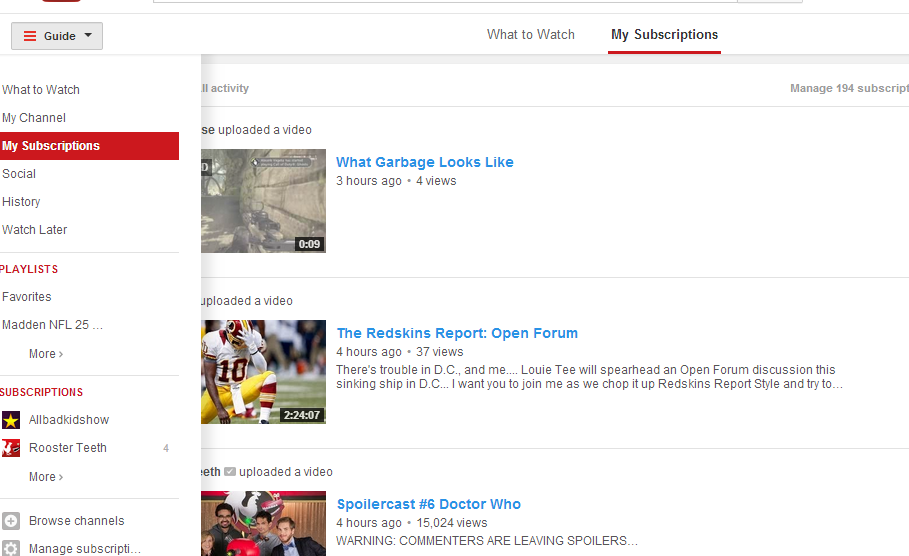
F Football Prodigy Joined Oct 15, 2013 Sythe Gold 0 Messages 262 Nov 23, 2013 #1 Is it possible to turn the youtube guide off? I know I can click it and it goes away but it pops up everytime I load a different page/videos
Is it possible to turn the youtube guide off? I know I can click it and it goes away but it pops up everytime I load a different page/videos
Swan When They Cry... Joined Jan 23, 2007 Sythe Gold 0 Messages 4,957 Location Australia Nov 23, 2013 #2 Plugin or browser problem perhaps. Keep everything up to date and / or try another browser.
Real knowledge is to know the extent of one's ignorance. Joined Dec 27, 2009 Sythe Gold 59 Messages 2,522 Location Netherlands Nov 23, 2013 #3 Might be a glitch on Google's end. Try restarting your computer as well.
P Patriarch Joined Nov 16, 2013 Sythe Gold 0 Messages 1,217 Nov 23, 2013 #4 Rebooting your computer should solve it.
F Football Prodigy Joined Oct 15, 2013 Sythe Gold 0 Messages 262 Nov 23, 2013 #5 I'll try restarting in a little while, thanks.
F Football Prodigy Joined Oct 15, 2013 Sythe Gold 0 Messages 262 Nov 23, 2013 #6 Restarting computer didn't do anything.
Real knowledge is to know the extent of one's ignorance. Joined Dec 27, 2009 Sythe Gold 59 Messages 2,522 Location Netherlands Nov 23, 2013 #7 Football Prodigy said: Restarting computer didn't do anything. Click to expand... What browser are you using? Did you update it? Did you try firefox/chrome as well?
Football Prodigy said: Restarting computer didn't do anything. Click to expand... What browser are you using? Did you update it? Did you try firefox/chrome as well?
F Football Prodigy Joined Oct 15, 2013 Sythe Gold 0 Messages 262 Nov 23, 2013 #8 Anthony1994 said: What browser are you using? Did you update it? Did you try firefox/chrome as well? Click to expand... I use Chrome and it's updated yes.
Anthony1994 said: What browser are you using? Did you update it? Did you try firefox/chrome as well? Click to expand... I use Chrome and it's updated yes.
B BGlave Joined Nov 11, 2011 Sythe Gold 0 Messages 1,933 Nov 23, 2013 #9 How would rebooting help fix that? Try clearing your cookies.
F Football Prodigy Joined Oct 15, 2013 Sythe Gold 0 Messages 262 Nov 23, 2013 #10 BGlave said: How would rebooting help fix that? Try clearing your cookies. Click to expand... No clue I just tried it because they suggested it lol.
BGlave said: How would rebooting help fix that? Try clearing your cookies. Click to expand... No clue I just tried it because they suggested it lol.
F Football Prodigy Joined Oct 15, 2013 Sythe Gold 0 Messages 262 Nov 23, 2013 #11 BGlave said: How would rebooting help fix that? Try clearing your cookies. Click to expand... Clearing my cookies did seem to help thanks.
BGlave said: How would rebooting help fix that? Try clearing your cookies. Click to expand... Clearing my cookies did seem to help thanks.
FireZ BRZ Club Member (2014) Joined Dec 3, 2009 Sythe Gold 2,410 Messages 27,899 Location Problems Desk Nov 24, 2013 #12 Help and requests section next time