



Full-Article Here: Mobile UI Rework 2.0 - Overview & Beta
Mobile UI Rework 2.0 - Overview & Beta
11 June 2024
Time to talk about the upcoming Mobile UI Beta. Wait, what year is it?!

Yes, we’re back with a long-awaited update on the new Mobile UI! After scouring through your feedback and taking your comments on board, the team have been hard at work delivering the newest experience for Mobile with your suggestions in mind!
A new Beta begins on Thursday, June 13th around ~12pm BST, where you’ll get to experience all the improvements from the original Beta, and plenty of new features too! The Beta will be open for around three days, so you’ll have plenty of time to explore over the weekend.
For more insight into the enhanced features and customisability we’re offering this time around, check out last year’s Mobile UI Rework - Overview and Open Beta newspost – or keep reading to learn all the details!
Here are the main changes you’ll see this time:
We’ll be keeping a close eye on discussion, particularly in the OSRS Mobile channel of the Official Old School Discord. At the end of this post you’ll also find a Mobile UI Beta Survey. If you choose to participate, please do fill it out – we love to hear your feedback!
How to Access the Beta
PLEASE MAKE SURE TO RECONVERT YOUR SAVE! CONVERTED SAVES DO NOT CARRY OVER DATA BETWEEN THE BETA WORLDS AND NORMAL WORLDS. IF YOU LEVEL UP ON THE BETA WORLD, YOU WILL NOT LEVEL UP ON YOUR MAIN GAME SAVE.
From Thursday 13th, you’ll have access to exclusive Beta worlds which use the new mobile UI.
If you’d like to use your main game save on a Beta world, we recommend first logging into a normal world and making your way to the Settings menu. Select Gameplay and scroll down to the bottom to see the new Beta worlds options.
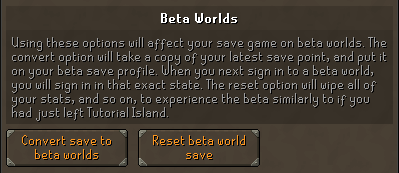
Here, you’ll be able to convert a save for use on the Beta Worlds from a regular world or reset your current Beta Worlds save for a fresh experience. Without a converted save, you’ll be shunted back to Tutorial Island with the rest of the n00bs – although since this is a Beta World, you’ll be offered a handy teleport to the mainland if you’d like to start your adventure right away.
You'll be able to access the content in the following worlds:
Once you’re done playing around in the Beta, simply switch to a normal world and resume playing!
What's New?
We’re making some pretty major changes in this Beta, but rest assured that they’ve been made while considering all kinds of different playstyles. Technical stuff aside we’ve also given the UI a new coat of paint to keep that Old School feel fresh.
Mobile UI Rework 2.0 - Overview & Beta
11 June 2024
Time to talk about the upcoming Mobile UI Beta. Wait, what year is it?!
Yes, we’re back with a long-awaited update on the new Mobile UI! After scouring through your feedback and taking your comments on board, the team have been hard at work delivering the newest experience for Mobile with your suggestions in mind!
A new Beta begins on Thursday, June 13th around ~12pm BST, where you’ll get to experience all the improvements from the original Beta, and plenty of new features too! The Beta will be open for around three days, so you’ll have plenty of time to explore over the weekend.
For more insight into the enhanced features and customisability we’re offering this time around, check out last year’s Mobile UI Rework - Overview and Open Beta newspost – or keep reading to learn all the details!
Here are the main changes you’ll see this time:
- Loadouts for hotkeys
- Side-stones returning to the left (via an option, which is off by default)
- NPC highlights and Edit Ground items hotkeys added
- Realignment of the visual elements to be aligned and tidier
- Chat filters button removed and moved to a long tap option
We’ll be keeping a close eye on discussion, particularly in the OSRS Mobile channel of the Official Old School Discord. At the end of this post you’ll also find a Mobile UI Beta Survey. If you choose to participate, please do fill it out – we love to hear your feedback!
How to Access the Beta
PLEASE MAKE SURE TO RECONVERT YOUR SAVE! CONVERTED SAVES DO NOT CARRY OVER DATA BETWEEN THE BETA WORLDS AND NORMAL WORLDS. IF YOU LEVEL UP ON THE BETA WORLD, YOU WILL NOT LEVEL UP ON YOUR MAIN GAME SAVE.
From Thursday 13th, you’ll have access to exclusive Beta worlds which use the new mobile UI.
If you’d like to use your main game save on a Beta world, we recommend first logging into a normal world and making your way to the Settings menu. Select Gameplay and scroll down to the bottom to see the new Beta worlds options.
Here, you’ll be able to convert a save for use on the Beta Worlds from a regular world or reset your current Beta Worlds save for a fresh experience. Without a converted save, you’ll be shunted back to Tutorial Island with the rest of the n00bs – although since this is a Beta World, you’ll be offered a handy teleport to the mainland if you’d like to start your adventure right away.
You'll be able to access the content in the following worlds:
- World 585 - AUS
- World 586 - GER
- World 587 - UK
- World 588 - US West
- World 589 - US East
Once you’re done playing around in the Beta, simply switch to a normal world and resume playing!
What's New?
We’re making some pretty major changes in this Beta, but rest assured that they’ve been made while considering all kinds of different playstyles. Technical stuff aside we’ve also given the UI a new coat of paint to keep that Old School feel fresh.