



deathbal sam
Apprentice

- Joined
- Sep 25, 2008
- Sythe Gold
- 0
- Messages
- 754
 How To Make A Phpbb Forum
Hello this is my guide on how to make a phpbb forum.
How To Install Phpbb I Will Be Doing It On 000webhost.com
Step 1 : getting phpbb files
go to www.phpbb.com
click on the downloads button
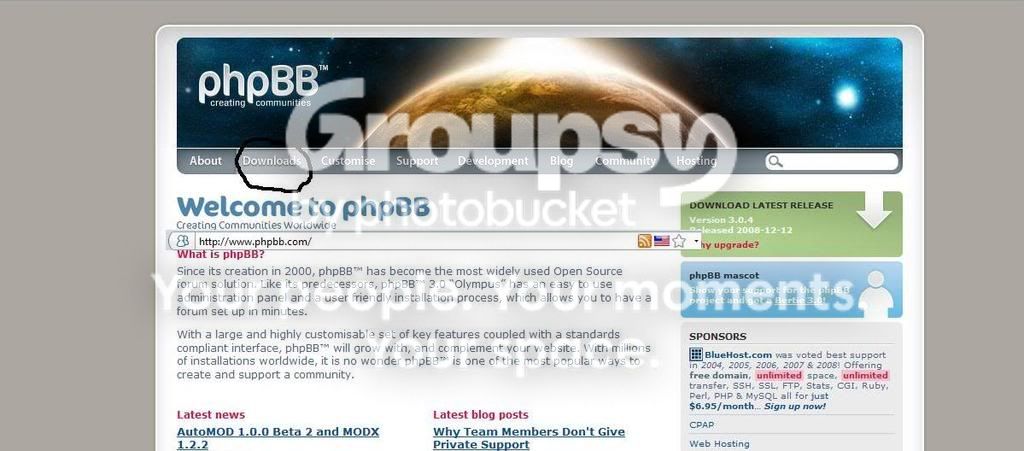
Then Select Download Stable Release Then On The Right Hand Side
On About The Middle Of The Page You Will See Download Phpbb 3.0.4.zip download that then extract.

[SIZE=""]Step 2 : Getting Your Host[/SIZE]
go to www.000webhost.com
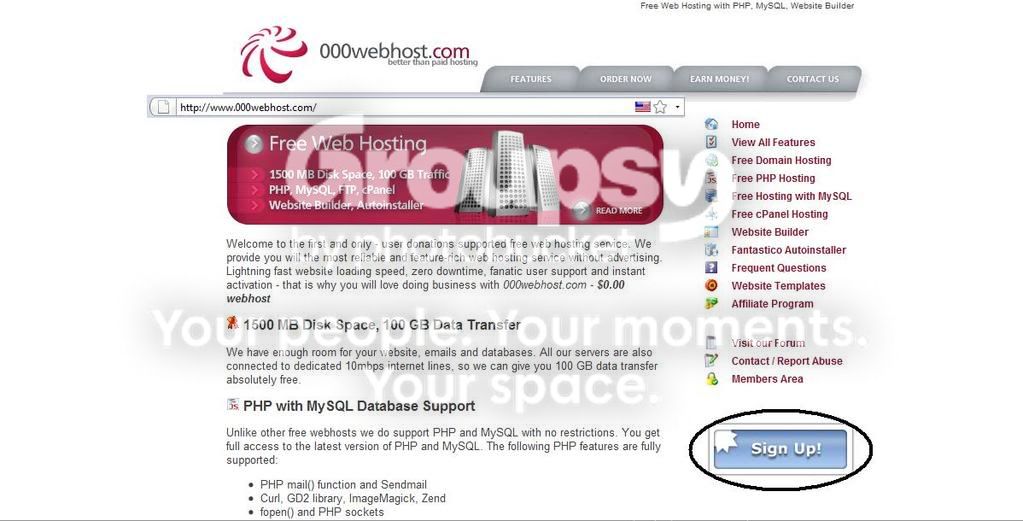
Click The Sign Up Button
Once your account is successfuly registered move onto step 3
Step 3 : Find Out Your FTP Details
once You login This page will come up

once In Cpanel select view ftp details

Then you will see your username password host and which folder to upload files too.
Step 4 : Getting And Installing FileZilla
There Are Many Different FTP Programmes but I Think FileZilla Is The best
GoTo http://filezilla-project.org/download.php?type=client and download client (win32setup.exe)
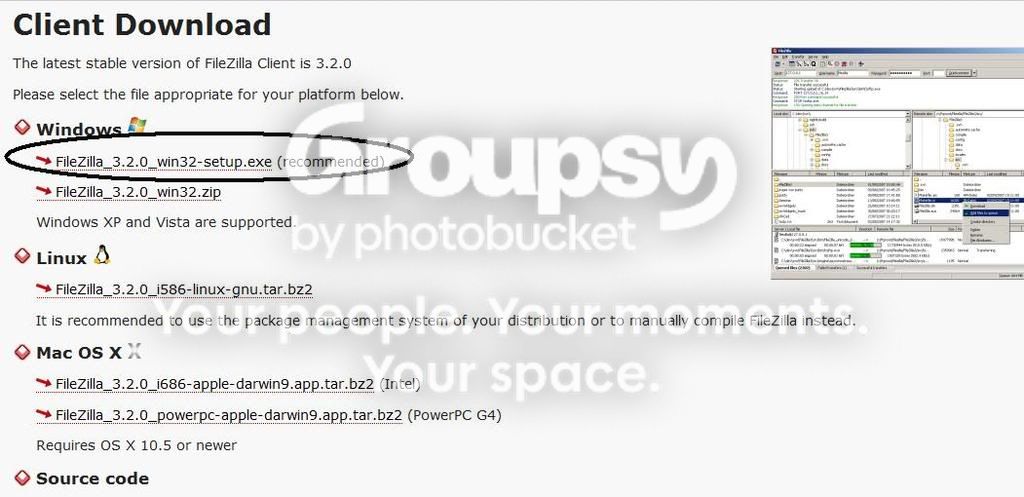
Then Start Up FileZilla once Installed enter All Your Ftp Details Up The Top And Port Is 21 Then You Should Find Your Phpbb Folder On The Left hand Side Then Open Up Public_html Folder On the Right hand Side.And Just Right Click On Your Phpbb Folder And Click Upload. Once That IS Done Move On To Step 5
Step 5 : Creating Your Mysql Database
Go To www.000webhost.com And Go To Your Cpanel
Click On Mysql

Then Fill Out The Form And Hit Create Database
Then Write Down Your Mysql Details Including The Host Which Should Be mysql6.000webhost.com Once Thats All Done Move Onto Step 6
Step 6 : Changing File Permissions.And Installing PhpBB
Now Go Onto Your Page eg, www.testguide.comoj.com
Then You Should See This Page Click The Install Button. Lets Go Through Install First.


Now On The Next age Down The Bottom You will See 5 Files Saying Found Unwriteable(The optional ones make it much easier to install)
Now Open Up FileZilla And Connect To Server As Before In Step 4
Now On The right Hand Side look For The Files Listed Above.That Are Unwriteable And Right ClickThen Click Fle Permissions And Tick All The Boxes (You Must Do This To Each One) Now Click Test Again At The Bottom Of the Page And It Should look Like This

If It Dosent Then You Have Not Done The Last step Correct. Then Click Start Install,Now Its time For Your Mysql Details Just Put Them In The Correct Boxes Like I Have

Then Once You Have Completed That Leave Database Server Port Blank and click The Proceed To Next step Button Then You Should Get A Page Saying Successful Conection Then Click proceed To Next Step
Then Just Fill In The Administration Details quite Simple then Click Proceed To next Step It SHould Say Test Passed Click Proceed Again
If You Have Done This right You Should Just Be Able To Click proceed To Next Step without Touch the config File Then Just Click proceed To Next Step At The Bottom Of the Page Then Proceed to Next Step Then Click Login.Now You Will See This Once In Admin Cp

Now Go Back Into FileZilla And Connect Then Delete The Installl Folder On The Right Hand Side Once You Have Deleted The Install Folder The Red Message Should Go Away.
Once You Have Deleted The Install Folder Find The Config.php File And Change The Permissions back to 644(using FileZilla Then refresh Your Page And Done) Have Fun
How To Install Phpbb I Will Be Doing It On 000webhost.com
Step 1 : getting phpbb files
go to www.phpbb.com
click on the downloads button
Then Select Download Stable Release Then On The Right Hand Side
On About The Middle Of The Page You Will See Download Phpbb 3.0.4.zip download that then extract.
[SIZE=""]Step 2 : Getting Your Host[/SIZE]
go to www.000webhost.com
Click The Sign Up Button
Once your account is successfuly registered move onto step 3
Step 3 : Find Out Your FTP Details
once You login This page will come up
once In Cpanel select view ftp details
Then you will see your username password host and which folder to upload files too.
Step 4 : Getting And Installing FileZilla
There Are Many Different FTP Programmes but I Think FileZilla Is The best
GoTo http://filezilla-project.org/download.php?type=client and download client (win32setup.exe)
Then Start Up FileZilla once Installed enter All Your Ftp Details Up The Top And Port Is 21 Then You Should Find Your Phpbb Folder On The Left hand Side Then Open Up Public_html Folder On the Right hand Side.And Just Right Click On Your Phpbb Folder And Click Upload. Once That IS Done Move On To Step 5
Step 5 : Creating Your Mysql Database
Go To www.000webhost.com And Go To Your Cpanel
Click On Mysql
Then Fill Out The Form And Hit Create Database
Then Write Down Your Mysql Details Including The Host Which Should Be mysql6.000webhost.com Once Thats All Done Move Onto Step 6
Step 6 : Changing File Permissions.And Installing PhpBB
Now Go Onto Your Page eg, www.testguide.comoj.com
Then You Should See This Page Click The Install Button. Lets Go Through Install First.
Now On The Next age Down The Bottom You will See 5 Files Saying Found Unwriteable(The optional ones make it much easier to install)
Now Open Up FileZilla And Connect To Server As Before In Step 4
Now On The right Hand Side look For The Files Listed Above.That Are Unwriteable And Right ClickThen Click Fle Permissions And Tick All The Boxes (You Must Do This To Each One) Now Click Test Again At The Bottom Of the Page And It Should look Like This
If It Dosent Then You Have Not Done The Last step Correct. Then Click Start Install,Now Its time For Your Mysql Details Just Put Them In The Correct Boxes Like I Have
Then Once You Have Completed That Leave Database Server Port Blank and click The Proceed To Next step Button Then You Should Get A Page Saying Successful Conection Then Click proceed To Next Step
Then Just Fill In The Administration Details quite Simple then Click Proceed To next Step It SHould Say Test Passed Click Proceed Again
If You Have Done This right You Should Just Be Able To Click proceed To Next Step without Touch the config File Then Just Click proceed To Next Step At The Bottom Of the Page Then Proceed to Next Step Then Click Login.Now You Will See This Once In Admin Cp
Now Go Back Into FileZilla And Connect Then Delete The Installl Folder On The Right Hand Side Once You Have Deleted The Install Folder The Red Message Should Go Away.
Once You Have Deleted The Install Folder Find The Config.php File And Change The Permissions back to 644(using FileZilla Then refresh Your Page And Done) Have Fun


