



nonamekiller
Guru


nonamekiller has reported a post.
Reason:
Forum: Aion General
Assigned Moderators: N/A
Posted by: Glarious
Original Content:
Reason:
Post: how to convert mod to wmv/avi/mp4/mov/mpg for Mac/WindowsProbably a virus + wrong section
Forum: Aion General
Assigned Moderators: N/A
Posted by: Glarious
Original Content:
Nowdays, more and more people use camcorder to record something happy, such as birthday party, wedding, graduation etc. While, maybe lots of you aren’t familiar with these tools, feeling frustrated about how to convert and import properly those .MOD video files. Now here, I give some little tips and hope it useful to all of you.
First, what’s Mod?
.Mod files are actually MPEG-2 files with AC3 audio, similar to a VOB file on a DVD or the M2T files used on Sony hard drive camcorders, this video file format is used on many digital camcorders, such as the JVC Everio, the Canon FS100 and the Panasonic D-Snap SD-card camcorders.
Second, why and how we convert them to what we wanted video formats?
Because .Mod file is not supported by iPod Touch, iPod Nano, iPod Classic, iPhone, Apple TV, PSP, Zune, Creative Zen etc, so if you want to import MOD files from your camcorders to play on iPod, even burn to DVD to keep them, you have to convert them.
Here, I’ll share you with a useful tool to solve this problem.
Part one: For Mac users:
Aiseesoft Mod Converter for Mac can help you convert Panasonic/JVC/Cannon etc. Mod file to AVI, convert Mod to FLV, MPG, MP4, MOV, FLV, 3GP, etc., then you can enjoy edit them, enjoy them on your portable devices.
Now, follow the step-by-step guide and start the conversion.
Step 0: Download, install and run Aiseesoft Mod Converter for Mac
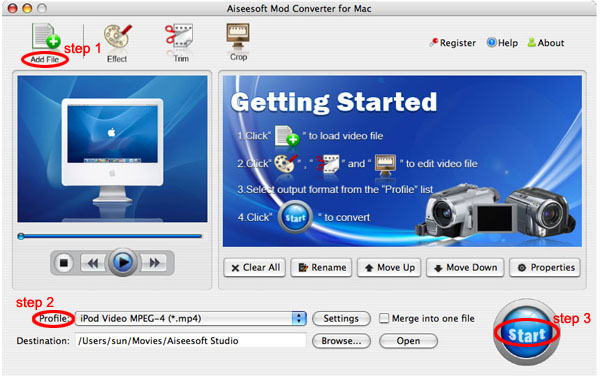
And after a while, you can see the following inferface:
Step 1: Load Video:
Click “Add File†button to browse your computer hard disc and load the MOD/TOD video files you want to convert to the software
Step 2: Set output video format
Click “Profile†button from the drop-down list to select the output video format such as AVI, MPG, MPEG and WMV. You can click the “Settings†button to set parameters of your output video such as Frame Rate, Bitrate to get the best video quality as you want.
Step 3: Click the “Start†button to start the conversion.
Tips:
This Mac Mod Converter also provides you with a series of video editing functions, such as crop video size, trim a clip of video, and merge several videos, set video effect.
1. Click "Effect" to make special effect for your movie.
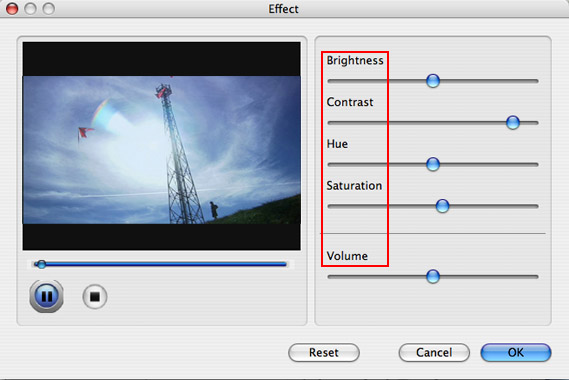
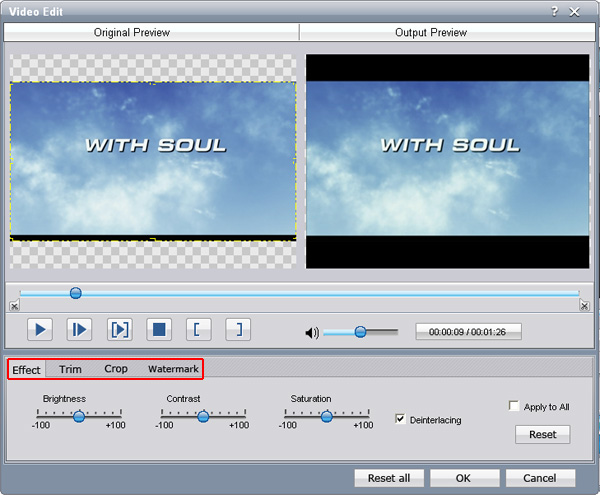
You can adjust the “Brightnessâ€, “Contrastâ€, “Saturation†and also you can use “deinterlacing†to improve you output effect.
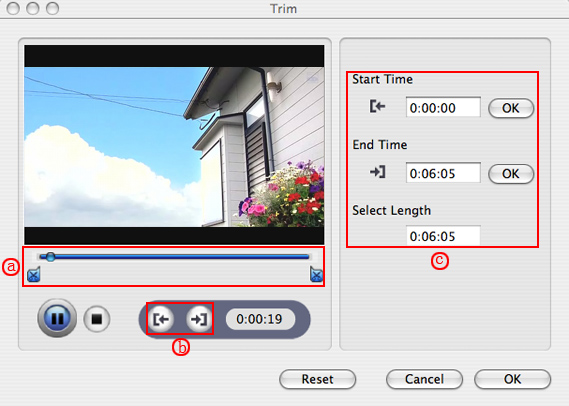
2. Trim:
“Trim†function allows you to pick up any part of your video to convert. You can just convert a part of your video that you want.
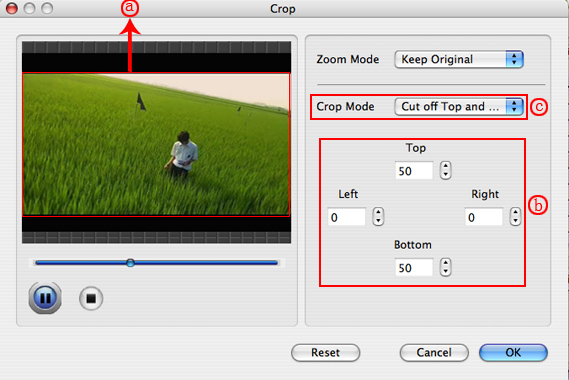
3: Crop:
Cut off the black edges of the original movie video and watch in full screen on your iPod using the "Crop" function.
4. Merge into one file
If you want to merge several Mod/Tod videos into one file you can choose them and click the “Merge into one file†to do it
Part two: For windows users:
Aiseesoft Mod Converter has the same function
Step 0: Download, install and run Aiseesoft Mod Converter
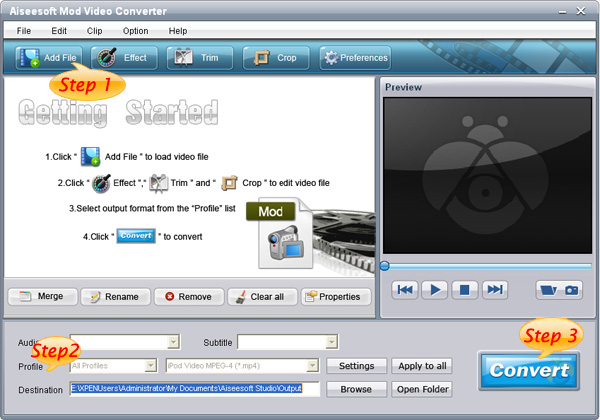
Step 1: Click “Add File†button to add your video files
Step 2: Set output video format
Step 3: Click the “Start†button to start the conversion.
Tips:
This powerful Mod Converter also allows you to do many editing works, such as “Trimâ€, “Crop†and “Effectâ€
After you convert MOD/TOD Video files with Aiseesoft Mod Converter, you can import MOD Movie from your camcorders to Windows Movie Maker, iPod, Zune, etc without problem.





